> ## Documentation Index
> Fetch the complete documentation index at: https://docs.liv.tv/llms.txt
> Use this file to discover all available pages before exploring further.
# Unity Quickstart Guide
1. Backup your project.
2. Import the LIV SDK into your project. (Assets > Import > Custom Package)
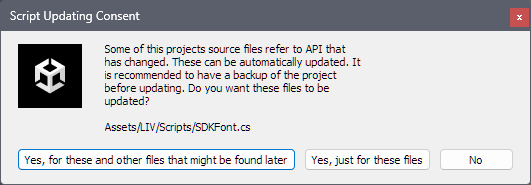
3. If Unity prompts you to upgrade deprecated APIs, then say "Yes".
 4. Add the LIV component anywhere in your project. Either spawn it every scene or use `DontDestroyOnLoad`.
5. Assign HMD Camera and Stage properties in the LIV script.
4. Add the LIV component anywhere in your project. Either spawn it every scene or use `DontDestroyOnLoad`.
5. Assign HMD Camera and Stage properties in the LIV script.
 6. If using Universal Render Pipeline, set upgrade package to support URP.
[Click here for the URP Walkthrough](https://docs.liv.tv/liv-mixed-reality-pcvr/pcvr-sdk-for-unity/universal-render-pipeline)
7. [Test your integration works](https://docs.liv.tv/liv-mixed-reality-pcvr/home-copied-4/overview-of-adding-liv-support-to-your-app).
Read on for more details and information on customising your integration.
6. If using Universal Render Pipeline, set upgrade package to support URP.
[Click here for the URP Walkthrough](https://docs.liv.tv/liv-mixed-reality-pcvr/pcvr-sdk-for-unity/universal-render-pipeline)
7. [Test your integration works](https://docs.liv.tv/liv-mixed-reality-pcvr/home-copied-4/overview-of-adding-liv-support-to-your-app).
Read on for more details and information on customising your integration.