> ## Documentation Index
> Fetch the complete documentation index at: https://docs.liv.tv/llms.txt
> Use this file to discover all available pages before exploring further.
# Universal Render Pipeline
## Setup
Make sure you've already setup the Unity SDK before following these steps:
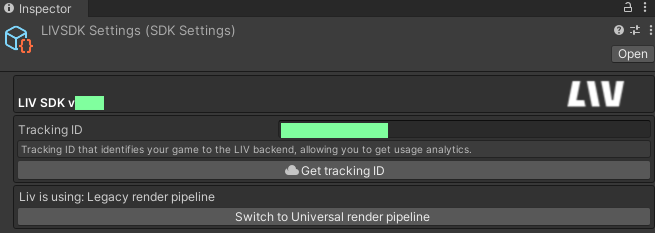
1. Navigate to `LIVSDKSettings` (Usually located at `Assets/LIV/Resources/LIVSDKSettings`) and click the "Switch To Universal Render Pipeline" button.
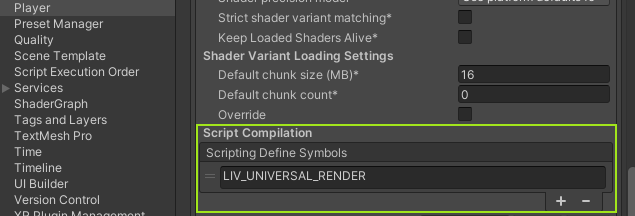
 2. Find `File/Build Settings/Player Settings/Other Settings/Scripting Define Symbols` and add LIV\_UNIVERSAL\_RENDER
 ## Unity 6
Unity 6000.0 introduced a new system called `RenderGraph`.
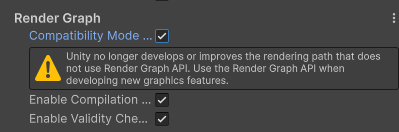
The current version of the LIV SDK still depends on Scriptable Render Passes and will require you to enable [Compatibility Mode](https://docs.unity3d.com/6000.0/Documentation/Manual/urp/compatibility-mode.html) when using the Universal Render Pipeline.
You can do so in `Project Settings > Graphics`, scroll all the way down and enable Compatibility mode.
## Unity 6
Unity 6000.0 introduced a new system called `RenderGraph`.
The current version of the LIV SDK still depends on Scriptable Render Passes and will require you to enable [Compatibility Mode](https://docs.unity3d.com/6000.0/Documentation/Manual/urp/compatibility-mode.html) when using the Universal Render Pipeline.
You can do so in `Project Settings > Graphics`, scroll all the way down and enable Compatibility mode.
 ## Versions Below 2.0
Additionally, for Versions `1.5.1`, `1.5.2`, `1.5.3` follow the following steps:
1. Find your Forward Renderer Asset(s) in the Unity project. (Note: There can be multiple renderer assets in your project. Make sure you're doing this for all of the renderer assets that will be used with LIV)
2. Under Renderer Features, add "SDK Universal Render Feature".
3. On your LIV component enable “Fix Post-Effects alpha channel”.
### High Definition Render Pipeline
*Currently unsupported.*
## Versions Below 2.0
Additionally, for Versions `1.5.1`, `1.5.2`, `1.5.3` follow the following steps:
1. Find your Forward Renderer Asset(s) in the Unity project. (Note: There can be multiple renderer assets in your project. Make sure you're doing this for all of the renderer assets that will be used with LIV)
2. Under Renderer Features, add "SDK Universal Render Feature".
3. On your LIV component enable “Fix Post-Effects alpha channel”.
### High Definition Render Pipeline
*Currently unsupported.*