> ## Documentation Index
> Fetch the complete documentation index at: https://docs.liv.tv/llms.txt
> Use this file to discover all available pages before exploring further.
# VR Rig Hierarchy
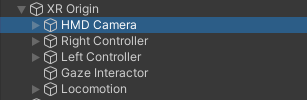
The LIV Unity SDK is interested in only two GameObjects: the HMD Camera and the XR Origin.
The XR Origin object is where LIV's camera will be inserted in your hierarchy.
* It must be set to the GameObject that contains the player's hands.
* It must contain the entire player.
### HMD Camera
This is the camera responsible for rendering the user’s HMD. The LIV SDK, by default clones this object to match your application’s rendering setup.
 ### XR Origin
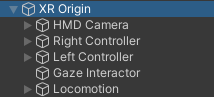
This is the topmost transform of your VR rig, it represents the centre of the user’s playspace. Usually this is the parent object to the HMD camera and controllers. When implementing VR locomotion (teleporting, joystick, etc), this is the GameObject that you should move around your scene.
### XR Origin
This is the topmost transform of your VR rig, it represents the centre of the user’s playspace. Usually this is the parent object to the HMD camera and controllers. When implementing VR locomotion (teleporting, joystick, etc), this is the GameObject that you should move around your scene.
 #### XR Origin Unity Component/Unity VR Template
If you're using the VR template, or a VR Rig that uses the "XR Origin" component from Unity, there's a couple of changes you need to make.
1. The "Tracking Origin Mode" in the XR Origin component must be set to Not Specified or Default.
#### XR Origin Unity Component/Unity VR Template
If you're using the VR template, or a VR Rig that uses the "XR Origin" component from Unity, there's a couple of changes you need to make.
1. The "Tracking Origin Mode" in the XR Origin component must be set to Not Specified or Default.
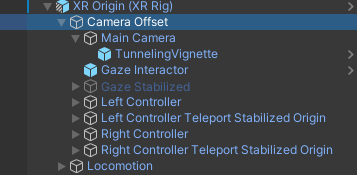
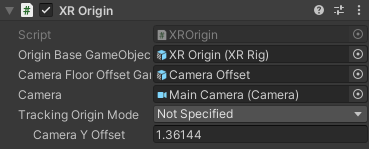 2. Counterintuitively, you should use the "Camera Offset" transform NOT the "XR Origin (XR Rig)" transform. This is due to how an additional camera offset is applied to the rig by the XR Origin component.