> ## Documentation Index
> Fetch the complete documentation index at: https://docs.liv.tv/llms.txt
> Use this file to discover all available pages before exploring further.
# Troubleshooting
> Troubleshoot common LIV Camera Kit issues in Unity. Installation errors, recording failures, audio problems, tablet issues, and platform-specific fixes.
Common issues and solutions when using LIV Camera Kit in Unity.
***
## Installation Issues
Close Unity completely, verify the `tv.liv.lck` and `tv.liv.lck-streaming` folders are placed directly inside `{YourProject}/Packages/` (not nested), then reopen Unity.
**Example**: [https://discord.com/channels/344602581735178260/1364680437485797398](https://discord.com/channels/344602581735178260/1364680437485797398)
 **Solution**
1. Confirm you've [properly installed LCK](https://docs.liv.tv/installation), noting that the editor must be closed first
2. Ensure you're not hiding packages. Toggle the 'eye control' to show or hide packages
**Solution**
1. Confirm you've [properly installed LCK](https://docs.liv.tv/installation), noting that the editor must be closed first
2. Ensure you're not hiding packages. Toggle the 'eye control' to show or hide packages
 Unity was open during installation. Close the editor, delete the partially installed LCK folders from Packages, and re-install with Unity closed. LCK requires native libraries to load at editor startup.
Close Unity before swapping SDK versions. Delete the old `tv.liv.lck` and `tv.liv.lck-streaming` folders first, then add the new versions. Upgrading while Unity is open will fail because Unity never unloads libraries during a session.
**Solution**: Ensure you are using a supported version of Unity, and have `Newtonsoft Json` installed in the package manager.
Fixed in v1.4.1+. Update to the latest SDK version.
**Problem**: You get an error
> Packages\tv.liv.lck\Runtime\Scripts\Streaming\LckStreamingController.cs(392,39): error CS1061: 'LckTopButtonsController' does not contain a definition for 'SetActive' and no accessible extension method 'SetActive' accepting a first argument of type 'LckTopButtonsController' could be found (are you missing a using directive or an assembly reference?)
>
> Packages\tv.liv.lck\Runtime\Scripts\Streaming\LckStreamingController.cs(390,64): error CS1061: 'LckTopButtonsController' does not contain a definition for 'activeSelf' and no accessible extension method 'activeSelf' accepting a first argument of type 'LckTopButtonsController' could be found (are you missing a using directive or an assembly reference?)
**Example** [https://discord.com/channels/344602581735178260/1464258924277665926](https://discord.com/channels/344602581735178260/1464258924277665926)
Unity was open during installation. Close the editor, delete the partially installed LCK folders from Packages, and re-install with Unity closed. LCK requires native libraries to load at editor startup.
Close Unity before swapping SDK versions. Delete the old `tv.liv.lck` and `tv.liv.lck-streaming` folders first, then add the new versions. Upgrading while Unity is open will fail because Unity never unloads libraries during a session.
**Solution**: Ensure you are using a supported version of Unity, and have `Newtonsoft Json` installed in the package manager.
Fixed in v1.4.1+. Update to the latest SDK version.
**Problem**: You get an error
> Packages\tv.liv.lck\Runtime\Scripts\Streaming\LckStreamingController.cs(392,39): error CS1061: 'LckTopButtonsController' does not contain a definition for 'SetActive' and no accessible extension method 'SetActive' accepting a first argument of type 'LckTopButtonsController' could be found (are you missing a using directive or an assembly reference?)
>
> Packages\tv.liv.lck\Runtime\Scripts\Streaming\LckStreamingController.cs(390,64): error CS1061: 'LckTopButtonsController' does not contain a definition for 'activeSelf' and no accessible extension method 'activeSelf' accepting a first argument of type 'LckTopButtonsController' could be found (are you missing a using directive or an assembly reference?)
**Example** [https://discord.com/channels/344602581735178260/1464258924277665926](https://discord.com/channels/344602581735178260/1464258924277665926)
 **Cause**: `tv.liv.lck-streaming` package can't be found in the \Packages folder
**Solution**:
1. If you want streaming functionality, the package must be included. It's part of the SDK download. Revivew [Unity Installation](/installation). Unzip and add the package
2. If it's intended to not include streaming, you will need to modify the below code. A future v1.4.4 patch will include this change but you can do it yourself ahead.
In LckStreamingController.s Line 390
```csharp LckStreamingController.s theme={null}
if (_topButtonsController && _topButtonsController.activeSelf == true)
{
_topButtonsController.SetActive(false);
}
```
With
```csharp LckStreamingController.s theme={null}
if (_topButtonsControllerGameObject && _topButtonsControllerGameObject.activeSelf == true)
{
_topButtonsControllerGameObject.SetActive(false);
}
```
***
## Recording Issues
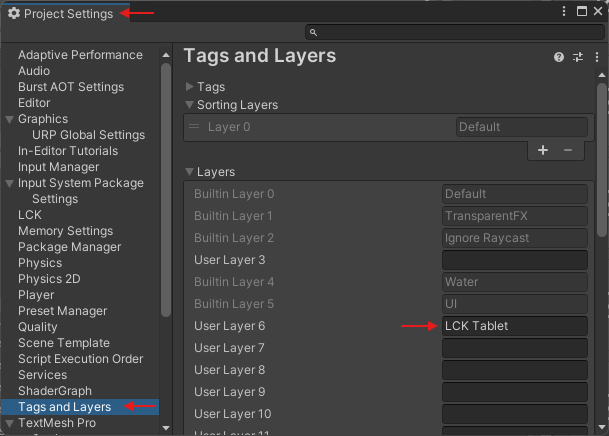
Cause: Unable to find LCK Tablet layer
Solution: Check that you've added the 'LCK Tablet' layer to your project layers.
**Cause**: `tv.liv.lck-streaming` package can't be found in the \Packages folder
**Solution**:
1. If you want streaming functionality, the package must be included. It's part of the SDK download. Revivew [Unity Installation](/installation). Unzip and add the package
2. If it's intended to not include streaming, you will need to modify the below code. A future v1.4.4 patch will include this change but you can do it yourself ahead.
In LckStreamingController.s Line 390
```csharp LckStreamingController.s theme={null}
if (_topButtonsController && _topButtonsController.activeSelf == true)
{
_topButtonsController.SetActive(false);
}
```
With
```csharp LckStreamingController.s theme={null}
if (_topButtonsControllerGameObject && _topButtonsControllerGameObject.activeSelf == true)
{
_topButtonsControllerGameObject.SetActive(false);
}
```
***
## Recording Issues
Cause: Unable to find LCK Tablet layer
Solution: Check that you've added the 'LCK Tablet' layer to your project layers.
 Fixed in v1.2.3. Update to the latest SDK. The issue was caused by an EGL context creation problem.
**Problem**: Prefab has been added. Recordings are saved but have NaN size when viewed in Meta Quest Developer Hub. The videos do not show up in the Meta Quest gallery app. Fmod audio is used in the project.
Example of user encountering this issue: [https://discord.com/channels/344602581735178260/1460258207535464501](https://discord.com/channels/344602581735178260/1460258207535464501)
**Solution**: Disable the option "Disable Unity Audio", add the right ifdefs LCK\_NOT\_UNITY\_AUDIO, then renable the "Disable Unity Audio" option.
Enable `DontDestroyOnLoad` on the tablet
Fixed in v1.3.4. Update to the latest SDK.
Fixed in v1.3.0. Update to the latest SDK.
Fixed in v1.4.3. Update to the latest SDK.
***
## Audio Issues
Set DSP buffer size to **Default** or **1024** in Unity Audio settings. Smaller buffer sizes cause drops that are more noticeable in recordings.
**Solution**: Ensure that you do not have two or more audio listeners in the scene, as this is not supported by LCK.
Add the correct scripting define: `LCK_FMOD` for FMOD 2.02, or `LCK_FMOD_2_03` for FMOD 2.03+. Place an `LckAudioMarker` on the target GameObject.
Add `LCK_WWISE` scripting define. Ensure you are on LCK v1.2.0+ for Wwise support. v1.2.1+ fixes additional Wwise capture issues.
Use `LCK_FMOD_WITH_UNITY_AUDIO` combined with `LCK_FMOD` if running FMOD alongside Photon Voice. Fixed in v1.2.0+.
If you're using Photon Voice make sure the microphone type is set to use Photon and disable the fallback option below it.
**Solution**:
As of LCK 1.4.3 there is now an LCK audio source which supports capturing FMOD audio and combining it with Unity audio (e.g. to pick up Photon Voice). The new audio source is `LckAudioCaptureFMODAndUnity`. To use it, ensure you have the following defines set:
* `LCK_FMOD` (and optionally, `LCK_FMOD_2_03` if you're using FMOD 2.03+)
* `LCK_FMOD_WITH_UNITY_AUDIO`
This will be automatically created by LCK on the `GameObject` with an `AudioListener` component in the scene, unless you've manually added an `ILckAudioSource` to your scene.
**Problem**: Recordings do not capture other player's voices. You can hear them in game but not in the video recordings. Your app is using Vivox.
**Example**: [https://discord.com/channels/344602581735178260/1461360067919220746](https://discord.com/channels/344602581735178260/1461360067919220746)
**Solution:** Verify that the audio capture component is instantiated on all client platforms, not just a subset. If the audio tap or capture interface is only initialized on certain platforms (e.g., desktop but not mobile/VR clients), remote audio sources will not be recorded correctly on the missing platforms.
**Troubleshooting steps:**
1. Check that audio capture initialization occurs on all target platforms
2. Verify platform-specific build configurations include necessary audio components
3. Ensure conditional compilation or platform checks aren't inadvertently excluding audio capture on certain clients
4. Test audio recording functionality on each platform independently to confirm proper instantiation
**Problem:** Video and/or audio stops being recorded when the scene changes.
Example: [https://discord.com/channels/344602581735178260/1455581743313584190](https://discord.com/channels/344602581735178260/1455581743313584190)
**Solution:** Use `[DontDestroyOnLoad](https://docs.unity3d.com/6000.3/Documentation/ScriptReference/Object.DontDestroyOnLoad.html)`call on the gameobject with the Audio or Video to ensure the component persists during scene changes.
***
## Tablet Issues
LCK v1.4.0+ updates tablet position in LateUpdate instead of Update. If jitter persists on v1.4.3+, configure the tablet position update order via `LCKCameraController`.
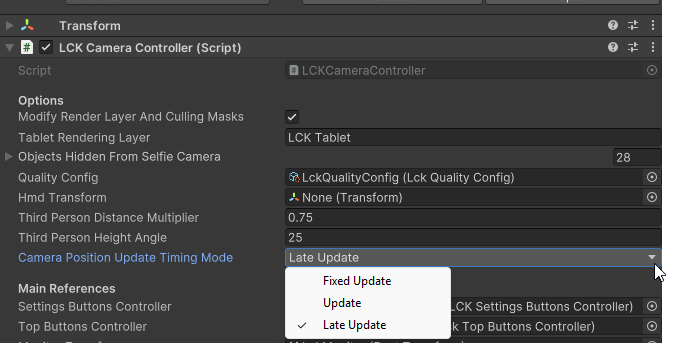
**Cause**: The provided tablet prefabs will automatically update camera positioning during `LateUpdate`. Depending on how locomotion / interaction is implemented in your game, you may wish to change this to avoid object jitter in captures.
**Solution**: Change the **Update Timing**
To change the update timing of tablet cameras, on the `LCKCameraController` component in your tablet prefab, use the "Camera Position Update Timing Mode" dropdown in the inspector.
`LCKCameraController` -> `CameraPositionUpdateTimingMode`
Fixed in v1.2.3. Update to the latest SDK. The issue was caused by an EGL context creation problem.
**Problem**: Prefab has been added. Recordings are saved but have NaN size when viewed in Meta Quest Developer Hub. The videos do not show up in the Meta Quest gallery app. Fmod audio is used in the project.
Example of user encountering this issue: [https://discord.com/channels/344602581735178260/1460258207535464501](https://discord.com/channels/344602581735178260/1460258207535464501)
**Solution**: Disable the option "Disable Unity Audio", add the right ifdefs LCK\_NOT\_UNITY\_AUDIO, then renable the "Disable Unity Audio" option.
Enable `DontDestroyOnLoad` on the tablet
Fixed in v1.3.4. Update to the latest SDK.
Fixed in v1.3.0. Update to the latest SDK.
Fixed in v1.4.3. Update to the latest SDK.
***
## Audio Issues
Set DSP buffer size to **Default** or **1024** in Unity Audio settings. Smaller buffer sizes cause drops that are more noticeable in recordings.
**Solution**: Ensure that you do not have two or more audio listeners in the scene, as this is not supported by LCK.
Add the correct scripting define: `LCK_FMOD` for FMOD 2.02, or `LCK_FMOD_2_03` for FMOD 2.03+. Place an `LckAudioMarker` on the target GameObject.
Add `LCK_WWISE` scripting define. Ensure you are on LCK v1.2.0+ for Wwise support. v1.2.1+ fixes additional Wwise capture issues.
Use `LCK_FMOD_WITH_UNITY_AUDIO` combined with `LCK_FMOD` if running FMOD alongside Photon Voice. Fixed in v1.2.0+.
If you're using Photon Voice make sure the microphone type is set to use Photon and disable the fallback option below it.
**Solution**:
As of LCK 1.4.3 there is now an LCK audio source which supports capturing FMOD audio and combining it with Unity audio (e.g. to pick up Photon Voice). The new audio source is `LckAudioCaptureFMODAndUnity`. To use it, ensure you have the following defines set:
* `LCK_FMOD` (and optionally, `LCK_FMOD_2_03` if you're using FMOD 2.03+)
* `LCK_FMOD_WITH_UNITY_AUDIO`
This will be automatically created by LCK on the `GameObject` with an `AudioListener` component in the scene, unless you've manually added an `ILckAudioSource` to your scene.
**Problem**: Recordings do not capture other player's voices. You can hear them in game but not in the video recordings. Your app is using Vivox.
**Example**: [https://discord.com/channels/344602581735178260/1461360067919220746](https://discord.com/channels/344602581735178260/1461360067919220746)
**Solution:** Verify that the audio capture component is instantiated on all client platforms, not just a subset. If the audio tap or capture interface is only initialized on certain platforms (e.g., desktop but not mobile/VR clients), remote audio sources will not be recorded correctly on the missing platforms.
**Troubleshooting steps:**
1. Check that audio capture initialization occurs on all target platforms
2. Verify platform-specific build configurations include necessary audio components
3. Ensure conditional compilation or platform checks aren't inadvertently excluding audio capture on certain clients
4. Test audio recording functionality on each platform independently to confirm proper instantiation
**Problem:** Video and/or audio stops being recorded when the scene changes.
Example: [https://discord.com/channels/344602581735178260/1455581743313584190](https://discord.com/channels/344602581735178260/1455581743313584190)
**Solution:** Use `[DontDestroyOnLoad](https://docs.unity3d.com/6000.3/Documentation/ScriptReference/Object.DontDestroyOnLoad.html)`call on the gameobject with the Audio or Video to ensure the component persists during scene changes.
***
## Tablet Issues
LCK v1.4.0+ updates tablet position in LateUpdate instead of Update. If jitter persists on v1.4.3+, configure the tablet position update order via `LCKCameraController`.
**Cause**: The provided tablet prefabs will automatically update camera positioning during `LateUpdate`. Depending on how locomotion / interaction is implemented in your game, you may wish to change this to avoid object jitter in captures.
**Solution**: Change the **Update Timing**
To change the update timing of tablet cameras, on the `LCKCameraController` component in your tablet prefab, use the "Camera Position Update Timing Mode" dropdown in the inspector.
`LCKCameraController` -> `CameraPositionUpdateTimingMode`
 To change the update timing of camera stabilizers, on each `LckStabilizer` component in your tablet prefab, use the "Stabilization Update Timing Mode" dropdown in the inspector.
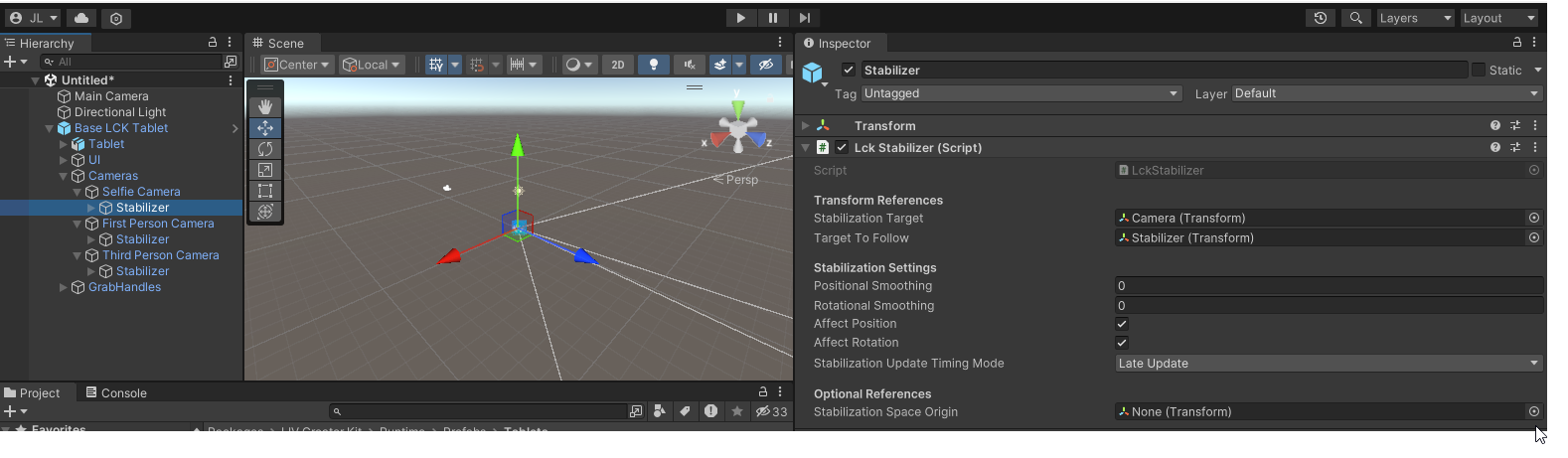 The available update timing options are:
* `FixedUpdate`
* `Update`
* `LateUpdate`
For more information on when these updates take place, see [Unity execution order documentation](https://docs.unity3d.com/6000.0/Documentation/Manual/execution-order.html).
For direct input, verify hand colliders have the `Hand` tag (or your custom tag in Project Settings > LCK > Trigger Enter Tag). For raycast input, confirm Ray Interactor raycast mask includes Default and UI layers.
The available update timing options are:
* `FixedUpdate`
* `Update`
* `LateUpdate`
For more information on when these updates take place, see [Unity execution order documentation](https://docs.unity3d.com/6000.0/Documentation/Manual/execution-order.html).
For direct input, verify hand colliders have the `Hand` tag (or your custom tag in Project Settings > LCK > Trigger Enter Tag). For raycast input, confirm Ray Interactor raycast mask includes Default and UI layers.
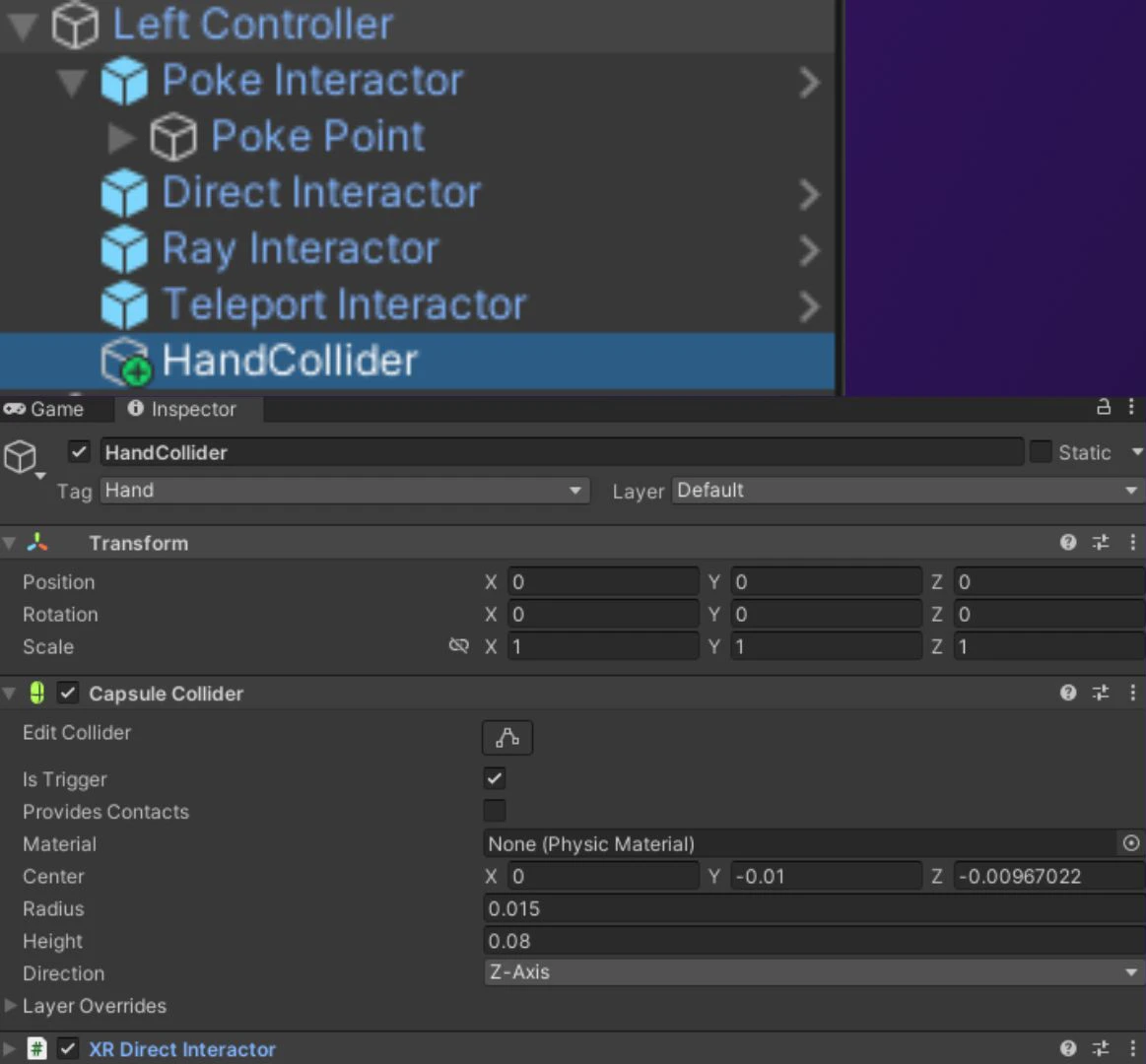 Also ensure the hand colliders have XR Direct Interactor and a Sphere Trigger Collider if using XR Interaction Toolkit.
Fixed in v1.3.4. The camera now handles player camera destruction after tablet spawn.
**Cause**: The tablet cameras being able to see the tablet visuals and is visible especially when smoothing is applied.
**Solution**: To fix ensure that the "LCK Tablet" layer is set in project settings, and that the LCK Tablet visuals are excluded from the LCK cameras in layer mask by unchecking "LCK Tablet"
**Cause**: This is usually caused by the lag in camera movement when smoothing is enabled.
**Solution:**
* Exclude the facial/head meshes from the LCK first person camera if possible.
* Increase the near clip plane value for LCK first person camera.
* Offset the LCK first person camera forward so that it is front of geometry.
**Problem**: You can see the tablet in the editor but when running the game you can't see the tablet
**Examples:**
[https://discord.com/channels/344602581735178260/1333013981459386430](https://discord.com/channels/344602581735178260/1333013981459386430)
[https://discord.com/channels/344602581735178260/1479790725670633664](https://discord.com/channels/344602581735178260/1479790725670633664)
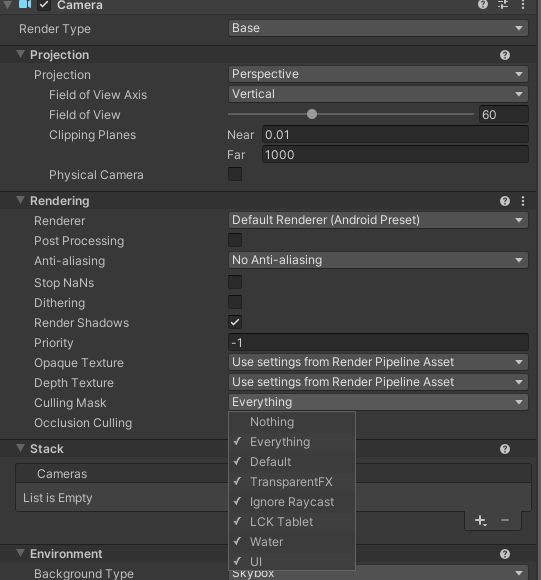
**Cause**: The camera culling mask is probably disabled
**Solution**: Enable LCK Tablet in the Culling Mask option
* Select your main camera
* Select Rendering -> Culling Mask
* Verify `LCK Tablet` is created and enabled in the main camera Culling Mask
Also ensure the hand colliders have XR Direct Interactor and a Sphere Trigger Collider if using XR Interaction Toolkit.
Fixed in v1.3.4. The camera now handles player camera destruction after tablet spawn.
**Cause**: The tablet cameras being able to see the tablet visuals and is visible especially when smoothing is applied.
**Solution**: To fix ensure that the "LCK Tablet" layer is set in project settings, and that the LCK Tablet visuals are excluded from the LCK cameras in layer mask by unchecking "LCK Tablet"
**Cause**: This is usually caused by the lag in camera movement when smoothing is enabled.
**Solution:**
* Exclude the facial/head meshes from the LCK first person camera if possible.
* Increase the near clip plane value for LCK first person camera.
* Offset the LCK first person camera forward so that it is front of geometry.
**Problem**: You can see the tablet in the editor but when running the game you can't see the tablet
**Examples:**
[https://discord.com/channels/344602581735178260/1333013981459386430](https://discord.com/channels/344602581735178260/1333013981459386430)
[https://discord.com/channels/344602581735178260/1479790725670633664](https://discord.com/channels/344602581735178260/1479790725670633664)
**Cause**: The camera culling mask is probably disabled
**Solution**: Enable LCK Tablet in the Culling Mask option
* Select your main camera
* Select Rendering -> Culling Mask
* Verify `LCK Tablet` is created and enabled in the main camera Culling Mask
 * Check you've initialized the LCK Service by placing the LCK Service Helper prefab in scene or otherwise.
* The screen will always look white in the editor and start displaying footage in play/runtime.
* Set Target Architecture target to ARM64
* \[Android Only] Check you're using Minimum API Level 32 or above.
* \[Selfie Camera Issue Only] Turn on depth texture for the LCK selfie camera.
***
## Platform Issues
As of v1.4.3, microphone permission timing is configurable in Project Settings > LCK (Startup, TabletSpawn, Mic Unmute, or Never).
LCK v1.4.0+ automatically adds internet permission and prevents `ForceRemoveInternetPermission`. Verify this is enabled in Project Settings > LCK.
GL resource leaks on Android and DX11 texture leaks on Windows were fixed in v1.2.2. Update to the latest SDK.
**Problem**: You're getting the error LCK requires Vulkan, OpenGLCore, or DirectX11 graphics API on Windows but you've already set those options in the project.
* Check you've initialized the LCK Service by placing the LCK Service Helper prefab in scene or otherwise.
* The screen will always look white in the editor and start displaying footage in play/runtime.
* Set Target Architecture target to ARM64
* \[Android Only] Check you're using Minimum API Level 32 or above.
* \[Selfie Camera Issue Only] Turn on depth texture for the LCK selfie camera.
***
## Platform Issues
As of v1.4.3, microphone permission timing is configurable in Project Settings > LCK (Startup, TabletSpawn, Mic Unmute, or Never).
LCK v1.4.0+ automatically adds internet permission and prevents `ForceRemoveInternetPermission`. Verify this is enabled in Project Settings > LCK.
GL resource leaks on Android and DX11 texture leaks on Windows were fixed in v1.2.2. Update to the latest SDK.
**Problem**: You're getting the error LCK requires Vulkan, OpenGLCore, or DirectX11 graphics API on Windows but you've already set those options in the project.
 **Example** of user encountering this issue: [https://discord.com/channels/344602581735178260/1459509001690677250](https://discord.com/channels/344602581735178260/1459509001690677250)
**Solution**: Restart the editor
**Why aren't UI buttons working correctly with AutoHands?**
AutoHands' input module only checks clicked objects for the `IPointerClickHandler` interface, which is implemented by standard Unity UI components like Button and Toggle. LCK button scripts (e.g. `LckDoubleButtonTrigger`) use `IPointerDownHandler` and `IPointerUpHandler` instead, which AutoHands does not check by default — causing UI click events to not forward correctly.
**Resolution:** This should be resolved on the AutoHands side by updating their interaction system to also check for `IPointerDownHandler` and `IPointerUpHandler`. LCK intentionally does not implement `IPointerClickHandler`, as doing so would cause unwanted behaviour with incremental button presses.
If you are still experiencing this issue, ensure you are on the latest version of AutoHands, as a fix has been issued to check for these additional interfaces.
***
## Still need help?
Join the [LIV Discord community](https://discord.com/invite/liv) for direct support from the LIV team.
**Example** of user encountering this issue: [https://discord.com/channels/344602581735178260/1459509001690677250](https://discord.com/channels/344602581735178260/1459509001690677250)
**Solution**: Restart the editor
**Why aren't UI buttons working correctly with AutoHands?**
AutoHands' input module only checks clicked objects for the `IPointerClickHandler` interface, which is implemented by standard Unity UI components like Button and Toggle. LCK button scripts (e.g. `LckDoubleButtonTrigger`) use `IPointerDownHandler` and `IPointerUpHandler` instead, which AutoHands does not check by default — causing UI click events to not forward correctly.
**Resolution:** This should be resolved on the AutoHands side by updating their interaction system to also check for `IPointerDownHandler` and `IPointerUpHandler`. LCK intentionally does not implement `IPointerClickHandler`, as doing so would cause unwanted behaviour with incremental button presses.
If you are still experiencing this issue, ensure you are on the latest version of AutoHands, as a fix has been issued to check for these additional interfaces.
***
## Still need help?
Join the [LIV Discord community](https://discord.com/invite/liv) for direct support from the LIV team.