> ## Documentation Index
> Fetch the complete documentation index at: https://docs.liv.tv/llms.txt
> Use this file to discover all available pages before exploring further.
# FMOD
> How to integrate FMOD Studio game audio capture with the LIV Camera Kit (LCK) SDK in Unreal Engine, including DSP-based master bus capture, FLCKFMODSource implementation, FMOD::DSP and FMOD::ChannelGroup usage, sample rate configuration, output format setup, and performance characteristics.
**Module:** LCKFMOD | **Version:** 1.0 | **Platforms:** All
## Overview
LCKFMOD provides integration with FMOD Studio, capturing game audio output for recording. This plugin hooks into the FMOD audio system to capture the final mixed output using a DSP node attached to the master channel group.
## Supported Channels
| Channel | Supported | Description |
| ------------ | --------- | ----------------------------- |
| `Game` | Yes | FMOD Studio master bus output |
| `Microphone` | No | Use LCKUnrealAudio or LCKOboe |
| `VoiceChat` | No | Use LCKVivox |
## Requirements
**LCKFMOD requires the FMODStudio plugin** which must be downloaded separately from [fmod.com](https://www.fmod.com/download). The LCKFMOD plugin is disabled by default and will not compile without FMODStudio installed.
* [FMODStudio plugin](https://www.fmod.com/download) for Unreal Engine
* FMOD Studio project configured in your game
## Dependencies
```csharp theme={null}
// Add to your .Build.cs
PublicDependencyModuleNames.AddRange(new string[] {
"LCKFMOD",
"LCKAudio",
"FMODStudio"
});
```
## Automatic Integration
The plugin automatically:
1. Detects FMOD Studio plugin presence
2. Registers capture callback on the master bus
3. Registers with the LCK audio system
## Source Implementation
### FLCKFMODSource
The core audio source class that captures game audio from the FMOD master channel group:
```cpp theme={null}
class FLCKFMODSource : public ILCKAudioSource
{
public:
FLCKFMODSource();
bool StartCapture() noexcept override;
bool StartCapture(TLCKAudioChannelsMask Channels) noexcept override;
void StopCapture() noexcept override;
const FString& GetSourceName() const noexcept override;
float GetVolume() const noexcept override;
int32 Samplerate = 48000;
private:
FMOD::DSP* CaptureDSP = nullptr;
FMOD::ChannelGroup* MasterGroup = nullptr;
};
```
| Member | Type | Description |
| ------------- | --------------------- | ------------------------------------------------------------- |
| `CaptureDSP` | `FMOD::DSP*` | Custom DSP node used for non-destructive audio interception |
| `MasterGroup` | `FMOD::ChannelGroup*` | Reference to the FMOD master channel group for DSP attachment |
## Capture Point
LCKFMOD captures audio from the FMOD master bus after all mixing and effects processing:
```
┌─────────────────────────────────────────┐
│ FMOD Studio System │
├─────────────────────────────────────────┤
│ Events → Mixer → Effects → Master Bus │
│ ↓ │
│ DSP Tail Position (Capture) │
└────────────────────────────┬────────────┘
│
┌──────▼──────┐
│ LCKFMOD │
│ Capture │
└─────────────┘
```
## Technical Details
### DSP-Based Capture
The plugin uses FMOD's DSP system to intercept audio non-destructively:
* A custom `FMOD::DSP` is created and attached at `FMOD_CHANNELCONTROL_DSP_TAIL` position on the master `FMOD::ChannelGroup`
* The DSP callback reads audio data without modifying the output
* Audio callback runs on the FMOD audio thread
* Data is marshaled to the game thread via `AsyncTask`
* PCM format: 32-bit float, interleaved
```cpp theme={null}
// Audio data callback (simplified)
FMODSource->OnAudioDataDelegate.BindLambda([](
TArrayView PCM,
int32 Channels,
int32 SampleRate,
ELCKAudioChannel SourceChannel)
{
// PCM is interleaved float data
// Callback runs on game thread after async marshaling
});
```
### DSP Lifecycle
1. **StartCapture** -- Creates a custom DSP, obtains the master `ChannelGroup`, and adds the DSP at tail position
2. **Audio callback** -- The DSP read callback copies PCM data and fires `OnAudioDataDelegate`
3. **StopCapture** -- Removes the DSP from the channel group and releases it
## Configuration
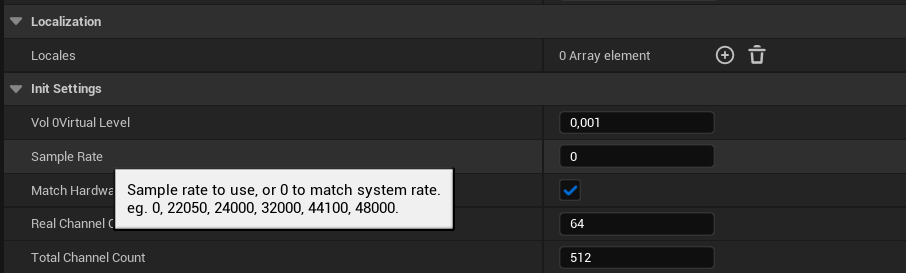
### Sample Rate
We recommend setting the sample rate explicitly to 48kHz rather than leaving it at 0 (auto):
 ### Output Format
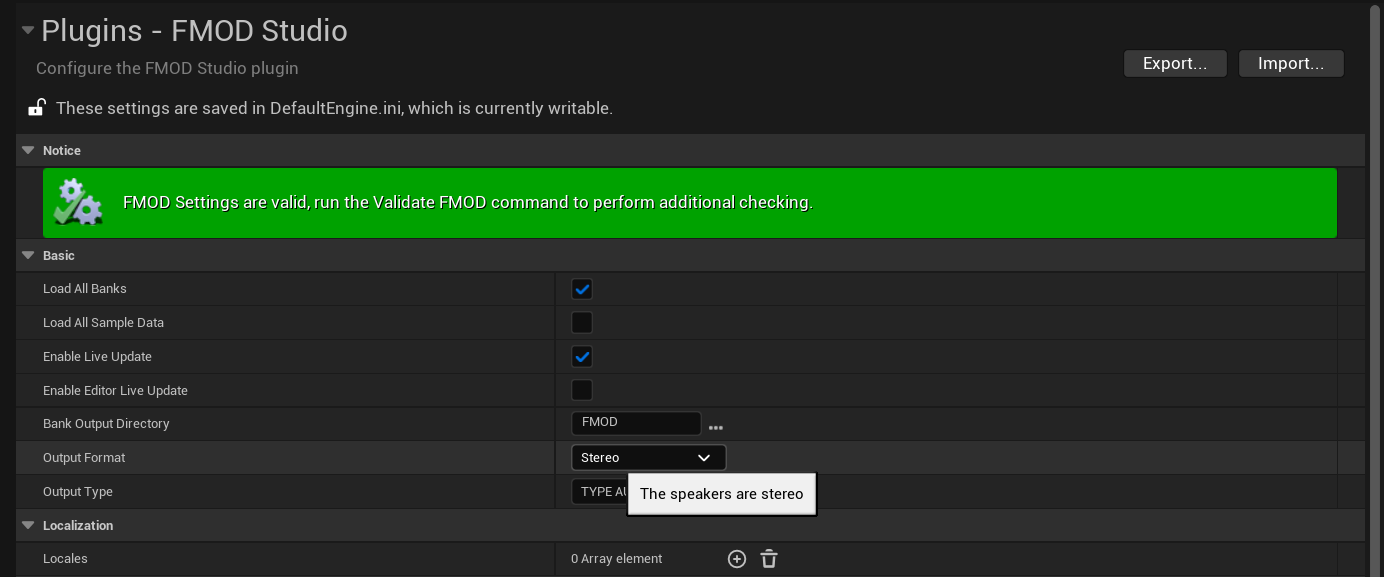
Set FMOD **Output Format** to **Stereo**. The default 5.1 surround is not supported at this time.
### Output Format
Set FMOD **Output Format** to **Stereo**. The default 5.1 surround is not supported at this time.
 Voice chat and game audio must match in samplerate, otherwise audio distortion will occur in recordings.
## Performance
LCKFMOD has minimal performance impact:
| Metric | Impact |
| ------- | -------------- |
| CPU | \< 1% overhead |
| Memory | \~2MB buffer |
| Latency | \< 1 frame |
FMOD's audio processing is highly optimized. LCKFMOD adds negligible overhead to the existing audio pipeline.
## Compatibility
| FMOD Version | Status |
| ------------ | --------- |
| 2.02.x | Supported |
| 2.01.x | Supported |
| 2.00.x | Supported |
## Troubleshooting
1. Verify FMOD Studio plugin is enabled
2. Check that audio is playing through FMOD
3. Verify master bus is not muted
4. Check LogLCKFMOD for errors
1. Check sample rate matches between FMOD and encoder
2. Verify buffer sizes are adequate
3. Check for CPU overload in FMOD profiler
1. Verify FMOD system is fully initialized before capture starts
2. Check that `MasterGroup` is valid
3. Look for FMOD error codes in LogLCKFMOD
## Log Category
```cpp theme={null}
DECLARE_LOG_CATEGORY_EXTERN(LogLCKFMOD, Log, All);
```
## See Also
Audio system architecture
Alternative middleware integration
Voice chat and game audio must match in samplerate, otherwise audio distortion will occur in recordings.
## Performance
LCKFMOD has minimal performance impact:
| Metric | Impact |
| ------- | -------------- |
| CPU | \< 1% overhead |
| Memory | \~2MB buffer |
| Latency | \< 1 frame |
FMOD's audio processing is highly optimized. LCKFMOD adds negligible overhead to the existing audio pipeline.
## Compatibility
| FMOD Version | Status |
| ------------ | --------- |
| 2.02.x | Supported |
| 2.01.x | Supported |
| 2.00.x | Supported |
## Troubleshooting
1. Verify FMOD Studio plugin is enabled
2. Check that audio is playing through FMOD
3. Verify master bus is not muted
4. Check LogLCKFMOD for errors
1. Check sample rate matches between FMOD and encoder
2. Verify buffer sizes are adequate
3. Check for CPU overload in FMOD profiler
1. Verify FMOD system is fully initialized before capture starts
2. Check that `MasterGroup` is valid
3. Look for FMOD error codes in LogLCKFMOD
## Log Category
```cpp theme={null}
DECLARE_LOG_CATEGORY_EXTERN(LogLCKFMOD, Log, All);
```
## See Also
Audio system architecture
Alternative middleware integration