> ## Documentation Index
> Fetch the complete documentation index at: https://docs.liv.tv/llms.txt
> Use this file to discover all available pages before exploring further.
# Wwise
> How to integrate Audiokinetic Wwise game audio capture with the LIV Camera Kit (LCK) SDK in Unreal Engine, including FLCKWwiseSource implementation with AkOutputDeviceID and WWise_CaptureCallback, ambisonic-to-stereo decoding, sample rate configuration, and platform support for Win64 and Android.
**Module:** LCKWwise | **Version:** 1.0 | **Platforms:** Win64, Android
## Overview
LCKWwise provides integration with Audiokinetic Wwise, capturing game audio output for recording. This plugin hooks into the Wwise audio system to capture the final mixed output using an output device capture callback.
## Supported Channels
| Channel | Supported | Description |
| ------------ | --------- | ----------------------------- |
| `Game` | Yes | Wwise master bus output |
| `Microphone` | No | Use LCKUnrealAudio or LCKOboe |
| `VoiceChat` | No | Use LCKVivox |
## Requirements
**LCKWwise requires the Wwise plugin** which must be downloaded separately from [Audiokinetic](https://www.audiokinetic.com/download/). The LCKWwise plugin is disabled by default and will not compile without Wwise installed.
* [Wwise plugin](https://www.audiokinetic.com/download/) for Unreal Engine
* Wwise project configured in your game
* Valid Wwise license
## Dependencies
```csharp theme={null}
// Add to your .Build.cs
PublicDependencyModuleNames.AddRange(new string[] {
"LCKWwise",
"LCKAudio",
"AkAudio"
});
```
## Automatic Integration
The plugin automatically:
1. Detects Wwise plugin presence
2. Registers output capture callback
3. Registers with the LCK audio system
## Source Implementation
### FLCKWwiseSource
The core audio source class that captures game audio from the Wwise output stage:
```cpp theme={null}
class FLCKWwiseSource : public ILCKAudioSource
{
public:
FLCKWwiseSource();
bool StartCapture() noexcept override;
bool StartCapture(TLCKAudioChannelsMask Channels) noexcept override;
void StopCapture() noexcept override;
const FString& GetSourceName() const noexcept override;
float GetVolume() const noexcept override;
private:
AkOutputDeviceID OutputDeviceId = 0;
int32 Samplerate = 48000;
};
```
| Member | Type | Description |
| ---------------- | ------------------ | ---------------------------------------------------------------- |
| `OutputDeviceId` | `AkOutputDeviceID` | Identifier for the Wwise output device used for capture |
| `Samplerate` | `int32` | Sample rate queried from the Wwise sound engine at capture start |
### WWise\_CaptureCallback
A static callback function registered with the Wwise sound engine. When Wwise delivers audio buffers, this callback converts the data and fires `OnAudioDataDelegate` with `ELCKAudioChannel::Game`.
## Capture Point
LCKWwise captures audio from the Wwise output stage after all processing:
```
┌─────────────────────────────────────────┐
│ Wwise Sound Engine │
├─────────────────────────────────────────┤
│ Events → Actor-Mixer → Master Bus │
│ ↓ │
│ Final Mix │
└────────────────────────┬────────────────┘
│
┌──────▼──────┐
│ LCKWwise │
│ Capture │
└─────────────┘
```
## Technical Details
### Capture Callback Registration
The plugin registers a capture callback with the Wwise sound engine:
```cpp theme={null}
bool FLCKWwiseSource::StartCapture() noexcept
{
if (auto* SoundEngine = IWwiseSoundEngineAPI::Get())
{
AkOutputSettings OutputSettings;
OutputSettings.channelConfig = AkChannelConfig::Standard(AK_SPEAKER_SETUP_STEREO);
SoundEngine->AddOutput(OutputSettings, &OutputDeviceId);
SoundEngine->RegisterCaptureCallback(WWise_CaptureCallback, OutputDeviceId, this);
Samplerate = SoundEngine->GetSampleRate();
}
return true;
}
```
### Ambisonic Support
The plugin supports 3rd-order ambisonic (16-channel) to stereo conversion:
```cpp theme={null}
// B-format decoding matrix for stereo
// Coefficients derived from spherical harmonics for +/-30 degree speakers
const float LeftMatrix[16] = {
0.707f, -0.612f, 0.0f, -0.353f, 0.223f, -0.223f, 0.0f, -0.096f,
0.096f, 0.0f, 0.05f, -0.05f, 0.0f, 0.02f, -0.02f, 0.0f
};
```
| Audio Format | Channels | Handling |
| ------------------- | -------- | ------------------ |
| Stereo | 2 | Direct passthrough |
| 3rd Order Ambisonic | 16 | Decoded to stereo |
Ambisonic decoding is limited to 3rd-order (16 channels). Higher-order ambisonics are not supported.
### Capture Lifecycle
1. **StartCapture** -- Adds a secondary Wwise output configured for stereo, registers `WWise_CaptureCallback`, and queries the engine sample rate
2. **Audio callback** -- `WWise_CaptureCallback` receives buffers from Wwise, performs ambisonic decoding if needed, and fires `OnAudioDataDelegate`
3. **StopCapture** -- Unregisters the capture callback and removes the output device
## Configuration
### Sample Rate and Channel Configuration
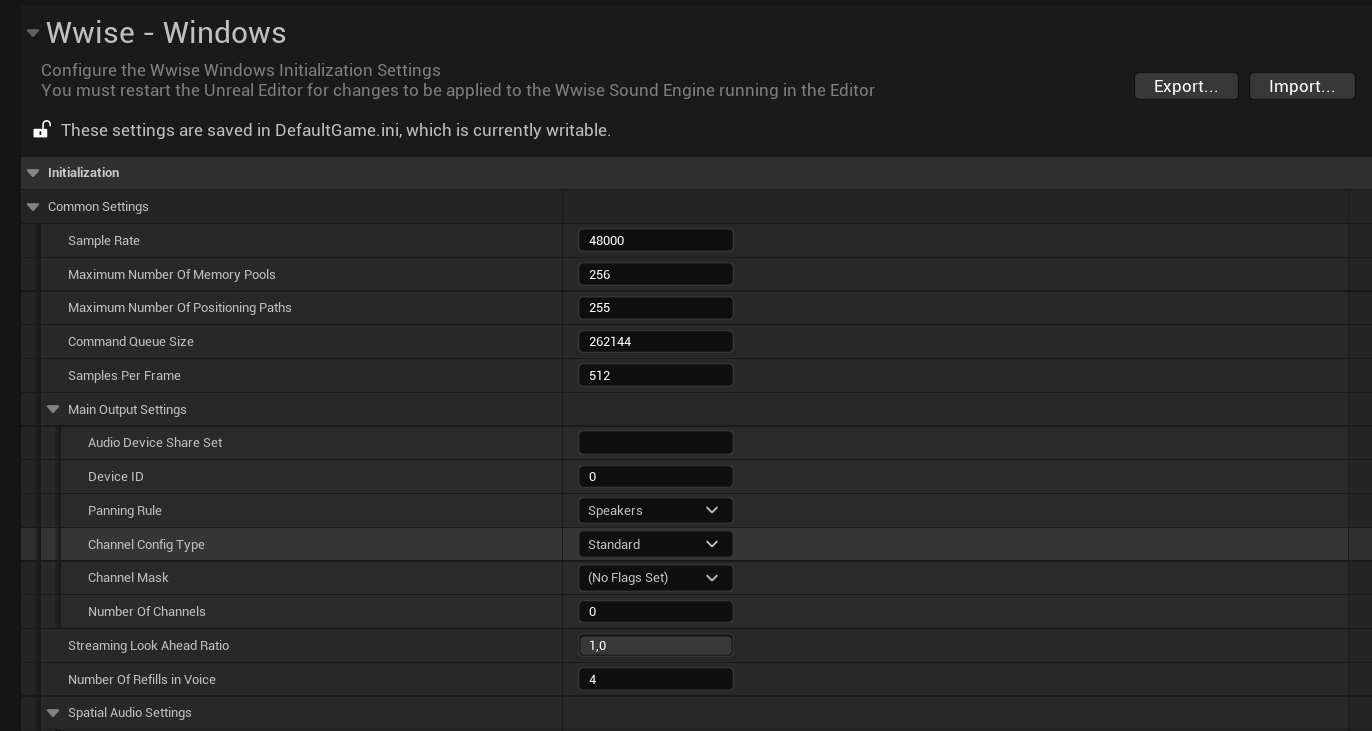
We recommend setting **Sample Rate** to 48000 and **Channel Config Type** to **Standard** (rather than Anonymous or Ambisonic).
 ### Channel Settings
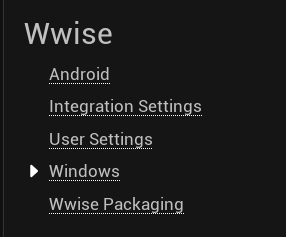
Setting Channels to 2 sometimes resolves audio issues. These settings need to be configured separately for Android and Windows, depending on your target platforms.
### Channel Settings
Setting Channels to 2 sometimes resolves audio issues. These settings need to be configured separately for Android and Windows, depending on your target platforms.
 Voice chat and game audio must match in samplerate, otherwise audio distortion will occur in recordings.
### Output Device Configuration
Ensure your Wwise project outputs to the appropriate device:
1. In Wwise Authoring, configure the Audio Device Shareset
2. Set output to match your game's audio output
3. Verify in Wwise Profiler that audio is flowing
## Platform Support
| Platform | Status | Notes |
| -------- | ------------- | --------------------------- |
| Win64 | Full support | Tested with Wwise 2021.1+ |
| Android | Full support | Tested on Quest 2/3 |
| Linux | Not supported | Wwise Linux support limited |
## Performance
| Metric | Impact |
| ------- | -------------- |
| CPU | \< 1% overhead |
| Memory | \~2MB buffer |
| Latency | \< 1 frame |
## Wwise Version Compatibility
| Wwise Version | Status |
| ------------- | --------- |
| 2023.1.x | Supported |
| 2022.1.x | Supported |
| 2021.1.x | Supported |
Older Wwise versions may have different callback APIs. Check release notes for compatibility.
## Troubleshooting
1. Verify Wwise plugin is enabled and initialized
2. Check Wwise Profiler for audio output
3. Verify output callback is registered (check LogLCKWwise)
4. Ensure `OutputDeviceId` is valid (not `AK_INVALID_OUTPUT_DEVICE_ID`)
1. Verify AkAudio module is available
2. Check plugin load order in .uproject
3. Look for Wwise initialization errors
1. Check Wwise project sample rate settings
2. Verify encoder sample rate matches
3. Consider resampling if rates differ
1. Verify Wwise is configured for 3rd-order ambisonic (16 channels)
2. Higher-order ambisonics are not supported
3. Try setting Channel Config Type to Standard stereo instead
## Log Category
```cpp theme={null}
DECLARE_LOG_CATEGORY_EXTERN(LogLCKWwise, Log, All);
```
## See Also
Audio system architecture
Alternative middleware integration
Voice chat and game audio must match in samplerate, otherwise audio distortion will occur in recordings.
### Output Device Configuration
Ensure your Wwise project outputs to the appropriate device:
1. In Wwise Authoring, configure the Audio Device Shareset
2. Set output to match your game's audio output
3. Verify in Wwise Profiler that audio is flowing
## Platform Support
| Platform | Status | Notes |
| -------- | ------------- | --------------------------- |
| Win64 | Full support | Tested with Wwise 2021.1+ |
| Android | Full support | Tested on Quest 2/3 |
| Linux | Not supported | Wwise Linux support limited |
## Performance
| Metric | Impact |
| ------- | -------------- |
| CPU | \< 1% overhead |
| Memory | \~2MB buffer |
| Latency | \< 1 frame |
## Wwise Version Compatibility
| Wwise Version | Status |
| ------------- | --------- |
| 2023.1.x | Supported |
| 2022.1.x | Supported |
| 2021.1.x | Supported |
Older Wwise versions may have different callback APIs. Check release notes for compatibility.
## Troubleshooting
1. Verify Wwise plugin is enabled and initialized
2. Check Wwise Profiler for audio output
3. Verify output callback is registered (check LogLCKWwise)
4. Ensure `OutputDeviceId` is valid (not `AK_INVALID_OUTPUT_DEVICE_ID`)
1. Verify AkAudio module is available
2. Check plugin load order in .uproject
3. Look for Wwise initialization errors
1. Check Wwise project sample rate settings
2. Verify encoder sample rate matches
3. Consider resampling if rates differ
1. Verify Wwise is configured for 3rd-order ambisonic (16 channels)
2. Higher-order ambisonics are not supported
3. Try setting Channel Config Type to Standard stereo instead
## Log Category
```cpp theme={null}
DECLARE_LOG_CATEGORY_EXTERN(LogLCKWwise, Log, All);
```
## See Also
Audio system architecture
Alternative middleware integration