> ## Documentation Index
> Fetch the complete documentation index at: https://docs.liv.tv/llms.txt
> Use this file to discover all available pages before exploring further.
# Project Settings
> How to configure the LIV Camera Kit (LCK) SDK in Unreal Engine Project Settings, including tracking ID, recording profiles, audio sources, and camera mode defaults.
## Accessing Settings
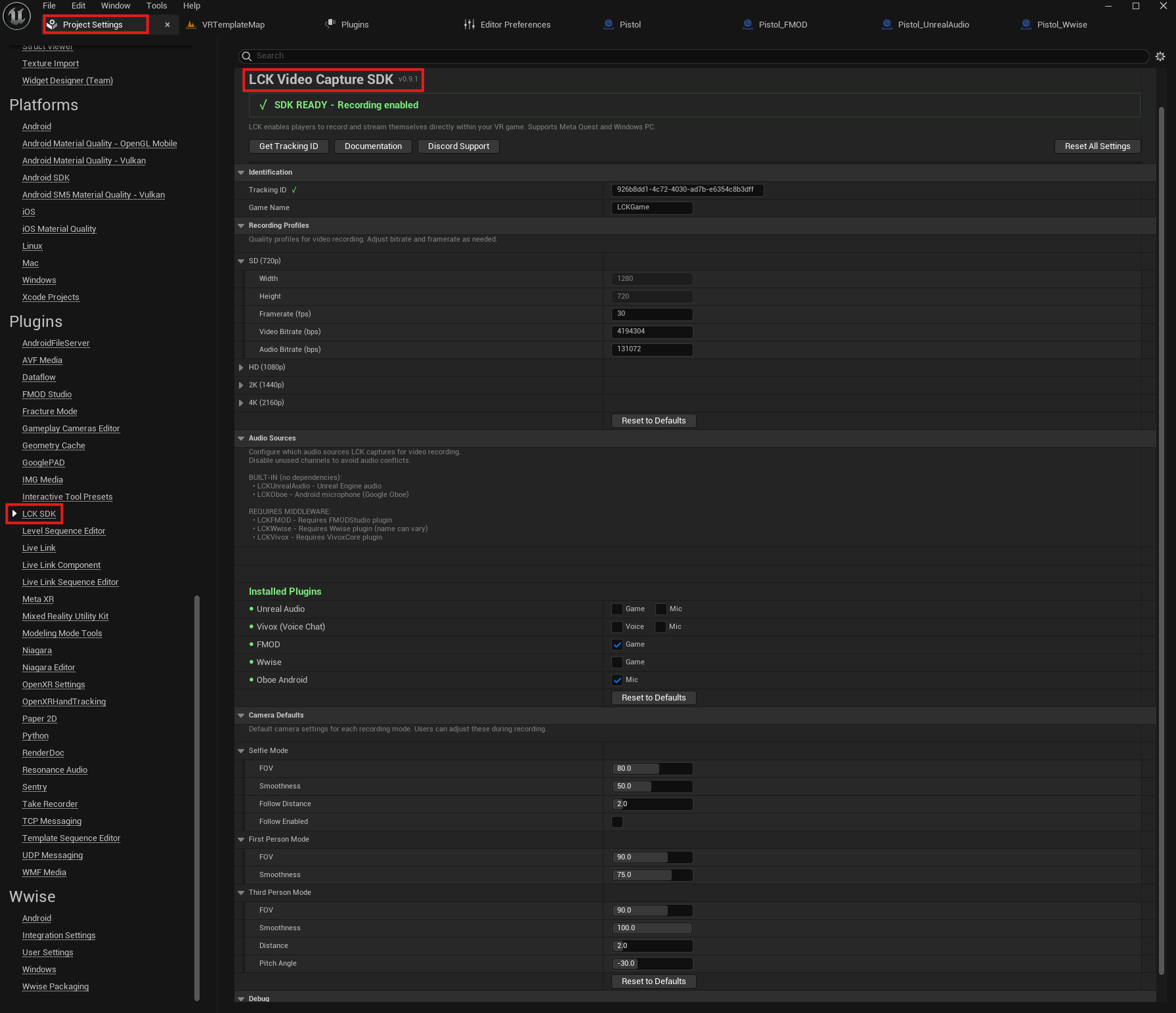
Navigate to **Project Settings > Plugins > LCK SDK** in the Unreal Editor.
You can also access settings programmatically:
```cpp theme={null}
#include "LCKDeveloperSettings.h"
ULCKDeveloperSettings* Settings = ULCKDeveloperSettings::Get();
```
 ***
## Identification
Unique tracking ID (UUID v4 format) for your game.
Get this from [dev.liv.tv](https://dev.liv.tv) - recording will not work without a valid ID.
Your game's display name as it appears in LIV analytics and video metadata.
***
## Features
Include RTMP streaming support in the build. When disabled, `librtmp` DLLs/SOs are **not** packaged, reducing APK/build size. Streaming API calls will fail at runtime if this is `false`.
`bEnableStreaming` defaults to `false`. You must enable it before any streaming functionality (authentication, live streaming) will work. See the [Streaming Overview](/unreal/streaming/overview) for full prerequisites.
***
## Encoder Lifecycle
The encoder is ref-counted. Multiple consumers (recording, streaming) can share a single encoder instance.
Acquires a reference to the encoder. Creates and starts it on the first call. Returns `false` if the encoder cannot be created.
```cpp theme={null}
UFUNCTION(BlueprintCallable, Category = "LCK")
bool AcquireEncoder(
bool bNeedsDisk = false,
int32 VideoBitrateOverride = 0,
int32 AudioBitrateOverride = 0
);
```
| Parameter | Type | Default | Description |
| ---------------------- | ------- | ------- | ------------------------------------------------------------------------------------------------------------------------------------------- |
| `bNeedsDisk` | `bool` | `false` | If `true`, ensures the encoder writes to an MP4 file. If the encoder is already running without disk output, it restarts with disk enabled. |
| `VideoBitrateOverride` | `int32` | `0` | Override video bitrate (bps). `0` uses the profile default. |
| `AudioBitrateOverride` | `int32` | `0` | Override audio bitrate (bps). `0` uses the profile default. |
Releases a reference to the encoder. When the ref count reaches zero, the encoder stops.
```cpp theme={null}
UFUNCTION(BlueprintCallable, Category = "LCK")
void ReleaseEncoder(bool bSaveFile = false);
```
| Parameter | Type | Default | Description |
| ----------- | ------ | ------- | ---------------------------------------------------------------------------------------------------- |
| `bSaveFile` | `bool` | `false` | If `true` and ref count hits zero, saves the recording to the gallery/Movies folder before stopping. |
Every `AcquireEncoder()` call must be paired with a `ReleaseEncoder()` call. Mismatched calls will either leak GPU resources (missing release) or stop the encoder while other consumers are active (extra release).
***
## Recording Profiles
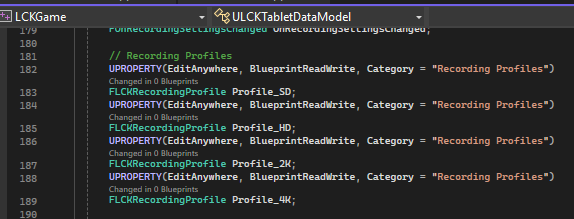
Four quality profiles are available, each with configurable settings:
***
## Identification
Unique tracking ID (UUID v4 format) for your game.
Get this from [dev.liv.tv](https://dev.liv.tv) - recording will not work without a valid ID.
Your game's display name as it appears in LIV analytics and video metadata.
***
## Features
Include RTMP streaming support in the build. When disabled, `librtmp` DLLs/SOs are **not** packaged, reducing APK/build size. Streaming API calls will fail at runtime if this is `false`.
`bEnableStreaming` defaults to `false`. You must enable it before any streaming functionality (authentication, live streaming) will work. See the [Streaming Overview](/unreal/streaming/overview) for full prerequisites.
***
## Encoder Lifecycle
The encoder is ref-counted. Multiple consumers (recording, streaming) can share a single encoder instance.
Acquires a reference to the encoder. Creates and starts it on the first call. Returns `false` if the encoder cannot be created.
```cpp theme={null}
UFUNCTION(BlueprintCallable, Category = "LCK")
bool AcquireEncoder(
bool bNeedsDisk = false,
int32 VideoBitrateOverride = 0,
int32 AudioBitrateOverride = 0
);
```
| Parameter | Type | Default | Description |
| ---------------------- | ------- | ------- | ------------------------------------------------------------------------------------------------------------------------------------------- |
| `bNeedsDisk` | `bool` | `false` | If `true`, ensures the encoder writes to an MP4 file. If the encoder is already running without disk output, it restarts with disk enabled. |
| `VideoBitrateOverride` | `int32` | `0` | Override video bitrate (bps). `0` uses the profile default. |
| `AudioBitrateOverride` | `int32` | `0` | Override audio bitrate (bps). `0` uses the profile default. |
Releases a reference to the encoder. When the ref count reaches zero, the encoder stops.
```cpp theme={null}
UFUNCTION(BlueprintCallable, Category = "LCK")
void ReleaseEncoder(bool bSaveFile = false);
```
| Parameter | Type | Default | Description |
| ----------- | ------ | ------- | ---------------------------------------------------------------------------------------------------- |
| `bSaveFile` | `bool` | `false` | If `true` and ref count hits zero, saves the recording to the gallery/Movies folder before stopping. |
Every `AcquireEncoder()` call must be paired with a `ReleaseEncoder()` call. Mismatched calls will either leak GPU resources (missing release) or stop the encoder while other consumers are active (extra release).
***
## Recording Profiles
Four quality profiles are available, each with configurable settings:
 | Setting | Default | Range | Description |
| ------------ | --------- | --------- | ---------------------- |
| Width | 1280 | Fixed | Video width in pixels |
| Height | 720 | Fixed | Video height in pixels |
| Framerate | 30 | 15-120 | Target FPS |
| VideoBitrate | 4,000,000 | 500K-100M | Video bitrate (bps) |
| AudioBitrate | 128,000 | 64K-512K | Audio bitrate (bps) |
| Samplerate | 48000 | Auto | Audio sample rate (Hz) |
| Setting | Default | Range | Description |
| ------------ | ---------- | --------- | ---------------------- |
| Width | 1920 | Fixed | Video width in pixels |
| Height | 1080 | Fixed | Video height in pixels |
| Framerate | 60 | 15-120 | Target FPS |
| VideoBitrate | 12,000,000 | 500K-100M | Video bitrate (bps) |
| AudioBitrate | 256,000 | 64K-512K | Audio bitrate (bps) |
| Samplerate | 48000 | Auto | Audio sample rate (Hz) |
| Setting | Default | Range | Description |
| ------------ | ---------- | --------- | ---------------------- |
| Width | 2560 | Fixed | Video width in pixels |
| Height | 1440 | Fixed | Video height in pixels |
| Framerate | 60 | 15-120 | Target FPS |
| VideoBitrate | 20,000,000 | 500K-100M | Video bitrate (bps) |
| AudioBitrate | 320,000 | 64K-512K | Audio bitrate (bps) |
| Samplerate | 48000 | Auto | Audio sample rate (Hz) |
| Setting | Default | Range | Description |
| ------------ | ---------- | --------- | ---------------------- |
| Width | 3840 | Fixed | Video width in pixels |
| Height | 2160 | Fixed | Video height in pixels |
| Framerate | 60 | 15-120 | Target FPS |
| VideoBitrate | 35,000,000 | 500K-100M | Video bitrate (bps) |
| AudioBitrate | 320,000 | 64K-512K | Audio bitrate (bps) |
| Samplerate | 48000 | Auto | Audio sample rate (Hz) |
For Meta Quest devices, start with HD (1080p) at 30 FPS. Higher resolutions may impact game performance.
### Customizing Profiles in Developer Settings
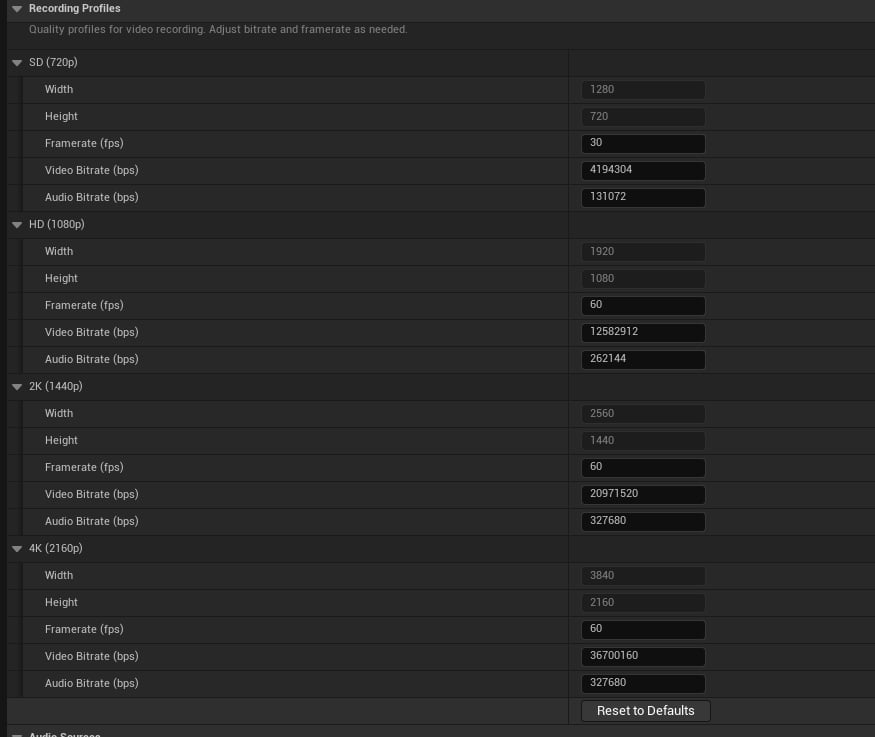
Recording profiles can be modified in the plugin settings to override the defaults:
| Setting | Default | Range | Description |
| ------------ | --------- | --------- | ---------------------- |
| Width | 1280 | Fixed | Video width in pixels |
| Height | 720 | Fixed | Video height in pixels |
| Framerate | 30 | 15-120 | Target FPS |
| VideoBitrate | 4,000,000 | 500K-100M | Video bitrate (bps) |
| AudioBitrate | 128,000 | 64K-512K | Audio bitrate (bps) |
| Samplerate | 48000 | Auto | Audio sample rate (Hz) |
| Setting | Default | Range | Description |
| ------------ | ---------- | --------- | ---------------------- |
| Width | 1920 | Fixed | Video width in pixels |
| Height | 1080 | Fixed | Video height in pixels |
| Framerate | 60 | 15-120 | Target FPS |
| VideoBitrate | 12,000,000 | 500K-100M | Video bitrate (bps) |
| AudioBitrate | 256,000 | 64K-512K | Audio bitrate (bps) |
| Samplerate | 48000 | Auto | Audio sample rate (Hz) |
| Setting | Default | Range | Description |
| ------------ | ---------- | --------- | ---------------------- |
| Width | 2560 | Fixed | Video width in pixels |
| Height | 1440 | Fixed | Video height in pixels |
| Framerate | 60 | 15-120 | Target FPS |
| VideoBitrate | 20,000,000 | 500K-100M | Video bitrate (bps) |
| AudioBitrate | 320,000 | 64K-512K | Audio bitrate (bps) |
| Samplerate | 48000 | Auto | Audio sample rate (Hz) |
| Setting | Default | Range | Description |
| ------------ | ---------- | --------- | ---------------------- |
| Width | 3840 | Fixed | Video width in pixels |
| Height | 2160 | Fixed | Video height in pixels |
| Framerate | 60 | 15-120 | Target FPS |
| VideoBitrate | 35,000,000 | 500K-100M | Video bitrate (bps) |
| AudioBitrate | 320,000 | 64K-512K | Audio bitrate (bps) |
| Samplerate | 48000 | Auto | Audio sample rate (Hz) |
For Meta Quest devices, start with HD (1080p) at 30 FPS. Higher resolutions may impact game performance.
### Customizing Profiles in Developer Settings
Recording profiles can be modified in the plugin settings to override the defaults:
 ***
## Audio Sources
Configure which audio sources are used for capture. Each plugin type has specific channel support.
### Unreal Audio
Built-in Unreal Engine audio capture. Disable channels here if another plugin handles them.
| Setting | Default | Description |
| ---------- | ------- | ------------------------- |
| Microphone | true | Enable microphone capture |
| Game Audio | true | Enable game audio capture |
If using FMOD or Wwise for game audio, disable "Game Audio" here to avoid conflicts.
### Vivox (Voice Chat)
Vivox voice chat capture. NOT a game audio middleware — can safely coexist with FMOD/Wwise.
| Setting | Default | Description |
| ----------- | ------- | --------------------------- |
| Microphone | true | Capture your voice |
| Voice Audio | true | Capture incoming voice chat |
### FMOD
FMOD audio middleware capture (game audio only).
| Setting | Default | Description |
| ---------- | ------- | ------------------- |
| Game Audio | true | Capture FMOD output |
### Wwise
Wwise audio middleware capture (game audio only).
| Setting | Default | Description |
| ---------- | ------- | -------------------- |
| Game Audio | true | Capture Wwise output |
### Oboe (Android)
High-performance microphone capture on Android using Google's Oboe library.
| Setting | Default | Description |
| ---------- | ------- | ------------------------------ |
| Microphone | true | Enable low-latency mic capture |
Game audio middleware priority: FMOD > Wwise > UnrealAudio.
Only one game audio source will be active at a time.
***
## Camera Mode Defaults
### Selfie Mode
| Setting | Default | Range | Description |
| -------------- | ------- | ------ | -------------------------------- |
| FOV | 80.0 | 20-120 | Field of view (degrees) |
| Smoothness | 50.0 | 0-100 | Camera movement smoothness (%) |
| FollowDistance | 2.0 | 0.5-10 | Distance when following (meters) |
| bFollowEnabled | false | - | Start with follow mode active |
### First Person Mode
| Setting | Default | Range | Description |
| ---------- | ------- | ------ | ------------------------------ |
| FOV | 90.0 | 20-120 | Field of view (degrees) |
| Smoothness | 75.0 | 0-100 | Camera movement smoothness (%) |
### Third Person Mode
| Setting | Default | Range | Description |
| ---------- | ------- | ------ | ------------------------------ |
| FOV | 90.0 | 20-120 | Field of view (degrees) |
| Smoothness | 100.0 | 0-100 | Camera movement smoothness (%) |
| Distance | 2.0 | 0.5-10 | Camera distance (meters) |
| PitchAngle | -30.0 | -90-90 | Vertical angle (degrees) |
***
## Internal Constants
These values are used internally and are not editable:
| Setting | Value | Description |
| ----------------------- | ----- | ------------------------------ |
| NotificationDisplayTime | 3.0s | How long notifications appear |
| PhotoFlashAnimationTime | 0.5s | Photo capture flash duration |
| ButtonCooldownTime | 0.25s | UI button cooldown |
| FOVStep | 5.0 | FOV increment per button press |
| SmoothnessStep | 5.0 | Smoothness increment |
| DistanceStep | 0.5 | Distance increment |
***
## Validation
### Audio Configuration Validation
```cpp theme={null}
FLCKAudioConfigValidation Validation = Settings->ValidateAudioConfig();
if (!Validation.bIsValid)
{
for (const FString& Warning : Validation.Warnings)
{
UE_LOG(LogLCK, Warning, TEXT("%s"), *Warning);
}
}
// Check active audio type
ELCKGameAudioType ActiveType = Validation.ActiveGameAudio;
```
### Build Info
```cpp theme={null}
// Get loaded audio plugins
TArray Plugins = Settings->GetLoadedAudioPlugins();
// Get formatted build info
FString BuildInfo = Settings->GetBuildInfoDescription();
```
***
## Configuration File
Settings are saved in `Config/DefaultGame.ini`:
```ini theme={null}
[/Script/LCKCore.LCKDeveloperSettings]
TrackingId=0000
GameName=MyGame
; Recording profiles
Profile_SD=(Width=1280,Height=720,Framerate=30,VideoBitrate=4000000,AudioBitrate=128000)
Profile_HD=(Width=1920,Height=1080,Framerate=60,VideoBitrate=12000000,AudioBitrate=256000)
; Audio sources
AudioSource_Unreal=(bMicrophoneEnabled=True,bGameAudioEnabled=True)
AudioSource_FMOD=(bGameAudioEnabled=True)
; Camera defaults
SelfieMode=(FOV=80.0,Smoothness=50.0,FollowDistance=2.0,bFollowEnabled=False)
```
***
## Audio Sources
Configure which audio sources are used for capture. Each plugin type has specific channel support.
### Unreal Audio
Built-in Unreal Engine audio capture. Disable channels here if another plugin handles them.
| Setting | Default | Description |
| ---------- | ------- | ------------------------- |
| Microphone | true | Enable microphone capture |
| Game Audio | true | Enable game audio capture |
If using FMOD or Wwise for game audio, disable "Game Audio" here to avoid conflicts.
### Vivox (Voice Chat)
Vivox voice chat capture. NOT a game audio middleware — can safely coexist with FMOD/Wwise.
| Setting | Default | Description |
| ----------- | ------- | --------------------------- |
| Microphone | true | Capture your voice |
| Voice Audio | true | Capture incoming voice chat |
### FMOD
FMOD audio middleware capture (game audio only).
| Setting | Default | Description |
| ---------- | ------- | ------------------- |
| Game Audio | true | Capture FMOD output |
### Wwise
Wwise audio middleware capture (game audio only).
| Setting | Default | Description |
| ---------- | ------- | -------------------- |
| Game Audio | true | Capture Wwise output |
### Oboe (Android)
High-performance microphone capture on Android using Google's Oboe library.
| Setting | Default | Description |
| ---------- | ------- | ------------------------------ |
| Microphone | true | Enable low-latency mic capture |
Game audio middleware priority: FMOD > Wwise > UnrealAudio.
Only one game audio source will be active at a time.
***
## Camera Mode Defaults
### Selfie Mode
| Setting | Default | Range | Description |
| -------------- | ------- | ------ | -------------------------------- |
| FOV | 80.0 | 20-120 | Field of view (degrees) |
| Smoothness | 50.0 | 0-100 | Camera movement smoothness (%) |
| FollowDistance | 2.0 | 0.5-10 | Distance when following (meters) |
| bFollowEnabled | false | - | Start with follow mode active |
### First Person Mode
| Setting | Default | Range | Description |
| ---------- | ------- | ------ | ------------------------------ |
| FOV | 90.0 | 20-120 | Field of view (degrees) |
| Smoothness | 75.0 | 0-100 | Camera movement smoothness (%) |
### Third Person Mode
| Setting | Default | Range | Description |
| ---------- | ------- | ------ | ------------------------------ |
| FOV | 90.0 | 20-120 | Field of view (degrees) |
| Smoothness | 100.0 | 0-100 | Camera movement smoothness (%) |
| Distance | 2.0 | 0.5-10 | Camera distance (meters) |
| PitchAngle | -30.0 | -90-90 | Vertical angle (degrees) |
***
## Internal Constants
These values are used internally and are not editable:
| Setting | Value | Description |
| ----------------------- | ----- | ------------------------------ |
| NotificationDisplayTime | 3.0s | How long notifications appear |
| PhotoFlashAnimationTime | 0.5s | Photo capture flash duration |
| ButtonCooldownTime | 0.25s | UI button cooldown |
| FOVStep | 5.0 | FOV increment per button press |
| SmoothnessStep | 5.0 | Smoothness increment |
| DistanceStep | 0.5 | Distance increment |
***
## Validation
### Audio Configuration Validation
```cpp theme={null}
FLCKAudioConfigValidation Validation = Settings->ValidateAudioConfig();
if (!Validation.bIsValid)
{
for (const FString& Warning : Validation.Warnings)
{
UE_LOG(LogLCK, Warning, TEXT("%s"), *Warning);
}
}
// Check active audio type
ELCKGameAudioType ActiveType = Validation.ActiveGameAudio;
```
### Build Info
```cpp theme={null}
// Get loaded audio plugins
TArray Plugins = Settings->GetLoadedAudioPlugins();
// Get formatted build info
FString BuildInfo = Settings->GetBuildInfoDescription();
```
***
## Configuration File
Settings are saved in `Config/DefaultGame.ini`:
```ini theme={null}
[/Script/LCKCore.LCKDeveloperSettings]
TrackingId=0000
GameName=MyGame
; Recording profiles
Profile_SD=(Width=1280,Height=720,Framerate=30,VideoBitrate=4000000,AudioBitrate=128000)
Profile_HD=(Width=1920,Height=1080,Framerate=60,VideoBitrate=12000000,AudioBitrate=256000)
; Audio sources
AudioSource_Unreal=(bMicrophoneEnabled=True,bGameAudioEnabled=True)
AudioSource_FMOD=(bGameAudioEnabled=True)
; Camera defaults
SelfieMode=(FOV=80.0,Smoothness=50.0,FollowDistance=2.0,bFollowEnabled=False)
```