> ## Documentation Index
> Fetch the complete documentation index at: https://docs.liv.tv/llms.txt
> Use this file to discover all available pages before exploring further.
# Telemetry
> How the LIV Camera Kit (LCK) SDK collects anonymous usage analytics in Unreal Engine, including tracking ID setup, telemetry events, privacy details, and dashboard access.
LCK sends anonymous usage telemetry to help improve the SDK. All data is aggregated and no personally identifiable information is collected.
## Overview
The LCK telemetry system tracks SDK usage to:
* Monitor recording success rates
* Identify common issues
* Improve SDK features
* Provide analytics on the LCK Dashboard
***
## Tracking ID
Every LCK integration requires a unique Tracking ID.
### Getting Your Tracking ID
1. Log in to the [LCK Dashboard](https://dashboard.liv.tv)
2. Create a new project or select existing
3. Copy your Tracking ID
### Configuring the Tracking ID
Navigate to **Project Settings > Plugins > LCK SDK** and enter your Tracking ID.
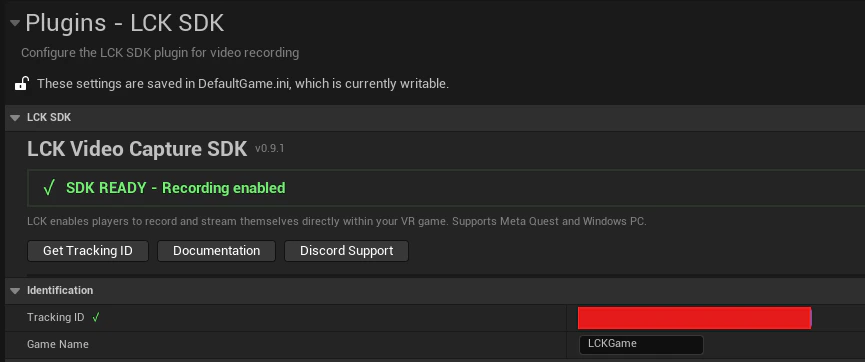 Recording will NOT work without a valid Tracking ID. Get yours from the LCK Dashboard before shipping.
***
## Telemetry Events
### ELCKTelemetryEventType
| Event | Description | When Sent |
| ------------------- | -------------------- | ----------------------------- |
| `GameInitialized` | Game initialized | On game start |
| `ServiceCreated` | LCK service created | When service is initialized |
| `ServiceDisposed` | LCK service disposed | When service is deinitialized |
| `CameraEnabled` | Camera enabled | When camera is activated |
| `CameraDisabled` | Camera disabled | When camera is deactivated |
| `RecordingStarted` | Recording began | When StartRecording called |
| `RecordingStopped` | Recording ended | When StopRecording called |
| `PhotoCaptured` | Photo captured | When TakePhoto called |
| `PhotoCaptureError` | Photo capture failed | On photo capture error |
| `RecorderError` | Recorder error | On encoder/save error |
| `SdkError` | SDK error | On general SDK error |
| `Performance` | Performance metrics | Periodically during recording |
| `StreamingStarted` | Streaming began | When streaming starts |
| `StreamingStopped` | Streaming ended | When streaming stops |
| `StreamingError` | Streaming failed | On streaming error |
***
## ULCKTelemetrySubsystem
The telemetry subsystem is a `UGameInstanceSubsystem` that manages all analytics.
### Sending Custom Events
```cpp theme={null}
ULCKTelemetrySubsystem* Telemetry = GetGameInstance()->GetSubsystem();
// Send a telemetry event
FLCKTelemetryEvent Event;
Event.EventType = ELCKTelemetryEventType::RecordingStarted;
FLCKTelemetryValue QualityValue;
QualityValue.StringValue = TEXT("HD");
QualityValue.ValueType = 2; // String
Event.Context.Add(TEXT("quality"), QualityValue);
Telemetry->SendTelemetry(Event);
```
### Querying Current State
```cpp theme={null}
FString TrackingId = Telemetry->GetCurrentTrackingId();
```
***
## Data Collected
### Session Data
| Field | Description | Example |
| -------------- | ------------------------ | -------------------- |
| Tracking ID | Your project identifier | `abc123-...` |
| Device ID | Hashed device identifier | MD5 hash |
| Platform | Operating system | `Windows`, `Android` |
| Engine Version | Unreal Engine version | `5.4.0` |
| SDK Version | LCK SDK version | `1.0` |
### Event Data
| Field | Description | Example |
| ---------- | ------------------- | ------------------ |
| Event Type | Type of event | `RecordingStarted` |
| Timestamp | When event occurred | ISO 8601 |
| Context | Additional details | `quality=HD` |
| Duration | Recording length | `120.5` seconds |
### Device ID Hashing
Device IDs are hashed using MD5 before transmission:
```cpp theme={null}
FString DeviceId = FPlatformMisc::GetDeviceId();
FString HashedId = FMD5::HashAnsiString(*DeviceId);
// Only the hash is sent, never the raw device ID
```
***
## Privacy
### What We Collect
* Anonymous usage statistics
* Error reports (no personal data)
* Feature usage patterns
* Recording success/failure rates
### What We DON'T Collect
* Personal information
* Video content
* Audio content
* User credentials
* IP addresses (beyond standard HTTP)
* Location data
### Data Retention
* Telemetry data is retained for 90 days
* Aggregated statistics are kept indefinitely
* Individual session data is not accessible
***
## Dashboard Analytics
View your telemetry data on the [LCK Dashboard](https://dashboard.liv.tv):
There's approximately a 24-hour delay in reporting to allow for data aggregation and privacy processing.
### Available Metrics
* Total recordings created
* Average recording duration
* Quality profile distribution
* Error rates by type
* Daily/weekly/monthly trends
* Platform breakdown
***
## Debugging Telemetry
Enable verbose logging to debug telemetry issues:
```ini theme={null}
; DefaultEngine.ini
[Core.Log]
LogLCK=VeryVerbose
```
Check telemetry status:
```cpp theme={null}
#if !UE_BUILD_SHIPPING
ULCKTelemetrySubsystem* Telemetry = GetGameInstance()->GetSubsystem();
UE_LOG(LogTemp, Log, TEXT("Tracking ID: %s"), *Telemetry->GetCurrentTrackingId());
UE_LOG(LogTemp, Log, TEXT("Tracking ID valid: %s"),
ULCKDeveloperSettings::Get()->IsTrackingIdValid() ? TEXT("Yes") : TEXT("No"));
#endif
```
***
## See Also
Configure Tracking ID and other settings
View your analytics
Recording will NOT work without a valid Tracking ID. Get yours from the LCK Dashboard before shipping.
***
## Telemetry Events
### ELCKTelemetryEventType
| Event | Description | When Sent |
| ------------------- | -------------------- | ----------------------------- |
| `GameInitialized` | Game initialized | On game start |
| `ServiceCreated` | LCK service created | When service is initialized |
| `ServiceDisposed` | LCK service disposed | When service is deinitialized |
| `CameraEnabled` | Camera enabled | When camera is activated |
| `CameraDisabled` | Camera disabled | When camera is deactivated |
| `RecordingStarted` | Recording began | When StartRecording called |
| `RecordingStopped` | Recording ended | When StopRecording called |
| `PhotoCaptured` | Photo captured | When TakePhoto called |
| `PhotoCaptureError` | Photo capture failed | On photo capture error |
| `RecorderError` | Recorder error | On encoder/save error |
| `SdkError` | SDK error | On general SDK error |
| `Performance` | Performance metrics | Periodically during recording |
| `StreamingStarted` | Streaming began | When streaming starts |
| `StreamingStopped` | Streaming ended | When streaming stops |
| `StreamingError` | Streaming failed | On streaming error |
***
## ULCKTelemetrySubsystem
The telemetry subsystem is a `UGameInstanceSubsystem` that manages all analytics.
### Sending Custom Events
```cpp theme={null}
ULCKTelemetrySubsystem* Telemetry = GetGameInstance()->GetSubsystem();
// Send a telemetry event
FLCKTelemetryEvent Event;
Event.EventType = ELCKTelemetryEventType::RecordingStarted;
FLCKTelemetryValue QualityValue;
QualityValue.StringValue = TEXT("HD");
QualityValue.ValueType = 2; // String
Event.Context.Add(TEXT("quality"), QualityValue);
Telemetry->SendTelemetry(Event);
```
### Querying Current State
```cpp theme={null}
FString TrackingId = Telemetry->GetCurrentTrackingId();
```
***
## Data Collected
### Session Data
| Field | Description | Example |
| -------------- | ------------------------ | -------------------- |
| Tracking ID | Your project identifier | `abc123-...` |
| Device ID | Hashed device identifier | MD5 hash |
| Platform | Operating system | `Windows`, `Android` |
| Engine Version | Unreal Engine version | `5.4.0` |
| SDK Version | LCK SDK version | `1.0` |
### Event Data
| Field | Description | Example |
| ---------- | ------------------- | ------------------ |
| Event Type | Type of event | `RecordingStarted` |
| Timestamp | When event occurred | ISO 8601 |
| Context | Additional details | `quality=HD` |
| Duration | Recording length | `120.5` seconds |
### Device ID Hashing
Device IDs are hashed using MD5 before transmission:
```cpp theme={null}
FString DeviceId = FPlatformMisc::GetDeviceId();
FString HashedId = FMD5::HashAnsiString(*DeviceId);
// Only the hash is sent, never the raw device ID
```
***
## Privacy
### What We Collect
* Anonymous usage statistics
* Error reports (no personal data)
* Feature usage patterns
* Recording success/failure rates
### What We DON'T Collect
* Personal information
* Video content
* Audio content
* User credentials
* IP addresses (beyond standard HTTP)
* Location data
### Data Retention
* Telemetry data is retained for 90 days
* Aggregated statistics are kept indefinitely
* Individual session data is not accessible
***
## Dashboard Analytics
View your telemetry data on the [LCK Dashboard](https://dashboard.liv.tv):
There's approximately a 24-hour delay in reporting to allow for data aggregation and privacy processing.
### Available Metrics
* Total recordings created
* Average recording duration
* Quality profile distribution
* Error rates by type
* Daily/weekly/monthly trends
* Platform breakdown
***
## Debugging Telemetry
Enable verbose logging to debug telemetry issues:
```ini theme={null}
; DefaultEngine.ini
[Core.Log]
LogLCK=VeryVerbose
```
Check telemetry status:
```cpp theme={null}
#if !UE_BUILD_SHIPPING
ULCKTelemetrySubsystem* Telemetry = GetGameInstance()->GetSubsystem();
UE_LOG(LogTemp, Log, TEXT("Tracking ID: %s"), *Telemetry->GetCurrentTrackingId());
UE_LOG(LogTemp, Log, TEXT("Tracking ID valid: %s"),
ULCKDeveloperSettings::Get()->IsTrackingIdValid() ? TEXT("Yes") : TEXT("No"));
#endif
```
***
## See Also
Configure Tracking ID and other settings
View your analytics