> ## Documentation Index
> Fetch the complete documentation index at: https://docs.liv.tv/llms.txt
> Use this file to discover all available pages before exploring further.
# Buttons
> How to use LIV Camera Kit (LCK) button components for VR touch input in Unreal Engine, including ULCKBaseButton, ULCKToggle, ULCKRecordButton, touch interaction setup, and tap event handling.
## ULCKBaseButton
Base class for all UI button components providing touch interaction, visual state management, and event delegation.
### Properties
| Property | Type | Description |
| --------------- | ----------------------- | -------------------------- |
| `ButtonType` | `ELCKButtonType` | Button shape type |
| `CollisionBox` | `UBoxComponent*` | Touch collision detection |
| `ButtonSmc` | `UStaticMeshComponent*` | Visual mesh |
| `ButtonLabel` | `UTextRenderComponent*` | Text label |
| `ButtonName` | `FName` | Identifier |
| `PressedOffset` | `FVector` | Visual offset when pressed |
### Events
Broadcast when button is tapped.
```cpp theme={null}
DECLARE_DYNAMIC_MULTICAST_DELEGATE(FOnTapStarted);
```
### Methods
| Method | Description |
| ----------------------------- | ------------------------- |
| `ButtonPressed(TapData)` | Handle press input |
| `ButtonReleased(TapData)` | Handle release input |
| `UpdateVisualsOnPressed()` | Set pressed visual state |
| `UpdateVisualsOnReleased()` | Set released visual state |
| `Show()` | Make visible |
| `Hide()` | Make hidden |
| `SetUVOffset(UVOffset)` | Set primary UV offset |
| `SetSecondUVOffset(UVOffset)` | Set secondary UV offset |
### Example
```cpp theme={null}
ULCKBaseButton* Button = CreateDefaultSubobject(TEXT("ActionButton"));
Button->SetupAttachment(RootComponent);
Button->ButtonName = TEXT("MyAction");
Button->OnTapStarted.AddDynamic(this, &AMyActor::HandleButtonTap);
void AMyActor::HandleButtonTap()
{
UE_LOG(LogTemp, Log, TEXT("Button tapped!"));
}
```
***
## ULCKToggle
Toggle button with on/off states and state-dependent icons.
### Properties
| Property | Type | Description |
| --------------- | ------------- | ------------------ |
| `ToggleOnIcon` | `UTexture2D*` | Icon for on state |
| `ToggleOffIcon` | `UTexture2D*` | Icon for off state |
### Methods
| Method | Description |
| ---------------------- | -------------------------------- |
| `UpdateVisuals(bIsOn)` | Update appearance based on state |
### Derived Classes
Microphone toggle button with mute/unmute icons.
Camera follow mode toggle for selfie camera.
Landscape/portrait orientation toggle.
Rectangle-shaped toggle button.
### Example
```cpp theme={null}
ULCKToggle* MicToggle = CreateDefaultSubobject(TEXT("MicToggle"));
MicToggle->ToggleOnIcon = MicOnTexture;
MicToggle->ToggleOffIcon = MicOffTexture;
MicToggle->OnTapStarted.AddDynamic(this, &AMyActor::OnMicToggled);
void AMyActor::OnMicToggled()
{
bMicEnabled = !bMicEnabled;
MicToggle->UpdateVisuals(bMicEnabled);
Service->SetMicrophoneEnabled(bMicEnabled);
}
```
***
## ULCKRectButton
Rectangle-shaped button for text labels and actions.
### Derived Classes
Camera flip/mirror toggle button.
***
## ULCKRecordButton
Record button with time display and recording state visualization. Implements `ILCKRecordable`.
### Events
Broadcast when record button is pressed.
```cpp theme={null}
DECLARE_MULTICAST_DELEGATE_OneParam(FOnRecordButtonPressed, ILCKRecordable*);
```
### Methods
| Method | Description |
| ------------------------- | ------------------------------- |
| `SetTime(NewTime)` | Update displayed recording time |
| `UpdateVisuals(NewState)` | Update for recording state |
### Example
```cpp theme={null}
ULCKRecordButton* RecordButton = CreateDefaultSubobject(TEXT("RecordButton"));
RecordButton->OnRecordButtonPressed.AddLambda([this](ILCKRecordable* Recordable) {
if (Service->IsRecording())
{
Service->StopRecording();
Recordable->UpdateVisuals(ELCKRecordingState::Saving);
}
else
{
Service->StartRecording();
Recordable->UpdateVisuals(ELCKRecordingState::Recording);
}
});
// Update time display during recording
void AMyActor::Tick(float DeltaTime)
{
if (Service->IsRecording())
{
RecordButton->SetTime(Service->GetCurrentRecordingDuration());
}
}
```
***
## ULCKVideoQualityButton
Video quality selection button cycling through SD, HD, 2K, 4K presets.
***
## ULCKOnScreenButton
Button rendered on the display surface for in-viewport interaction.
### Derived Classes
Flip button on display surface.
Photo capture button on display surface.
***
## Touch Interaction
### Enabling Interactions
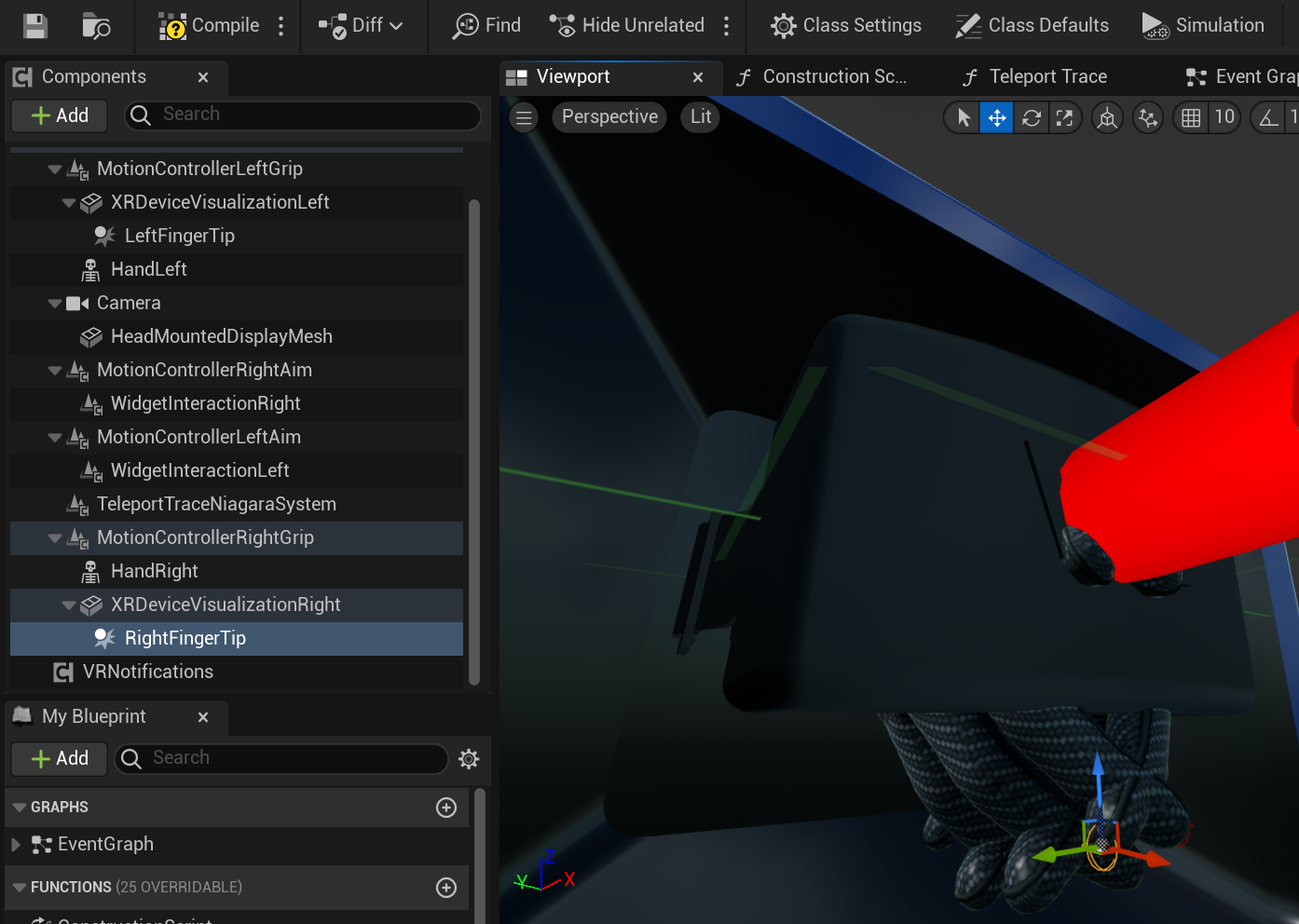
Interaction with the UI is collision-based. The simplest way to enable interactions is to add a **SphereCollider** with 5-10mm radius to the index fingertip.
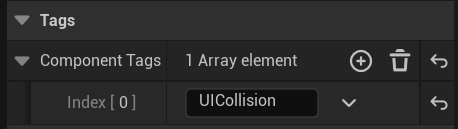
 Make sure that the collider has the **UICollision** tag. It's used to filter collision for UI.
 ### FLCKTapData
Touch event data structure.
```cpp theme={null}
USTRUCT()
struct LCKUI_API FLCKTapData
{
FVector ButtonLocation; // World position of button
FVector ButtonRightVector; // Button's right vector
FVector ButtonForwardVector; // Button's forward vector
FVector TapLocation; // World position of tap
bool IsPressed; // Currently pressed state
};
```
### Interaction Direction
Configure which direction validates touch input:
```cpp theme={null}
UENUM(BlueprintType)
enum class ELCKButtonInteractionDirection : uint8
{
Forward, // Touch must come from front
Up // Touch must come from above
};
Button->SetButtonInteractionDirection(ELCKButtonInteractionDirection::Forward);
```
### Cooldown
Buttons have a built-in 0.25s cooldown to prevent accidental double-taps. This is handled automatically by `FLCKConstants::CoolDownTime`.
Don't add additional cooldown logic in your code — the SDK handles this automatically.
### FLCKTapData
Touch event data structure.
```cpp theme={null}
USTRUCT()
struct LCKUI_API FLCKTapData
{
FVector ButtonLocation; // World position of button
FVector ButtonRightVector; // Button's right vector
FVector ButtonForwardVector; // Button's forward vector
FVector TapLocation; // World position of tap
bool IsPressed; // Currently pressed state
};
```
### Interaction Direction
Configure which direction validates touch input:
```cpp theme={null}
UENUM(BlueprintType)
enum class ELCKButtonInteractionDirection : uint8
{
Forward, // Touch must come from front
Up // Touch must come from above
};
Button->SetButtonInteractionDirection(ELCKButtonInteractionDirection::Forward);
```
### Cooldown
Buttons have a built-in 0.25s cooldown to prevent accidental double-taps. This is handled automatically by `FLCKConstants::CoolDownTime`.
Don't add additional cooldown logic in your code — the SDK handles this automatically.