LCK sends anonymous usage telemetry to help improve the SDK. All data is aggregated and no personally identifiable information is collected.
Overview
The LCK telemetry system tracks SDK usage to:
- Monitor recording success rates
- Identify common issues
- Improve SDK features
- Provide analytics on the LCK Dashboard
Tracking ID
Every LCK integration requires a unique Tracking ID.
Getting Your Tracking ID
- Log in to the LCK Dashboard
- Create a new project or select existing
- Copy your Tracking ID
Configuring the Tracking ID
Project Settings:
Navigate to Project Settings > Plugins > LCK SDK and enter your Tracking ID.
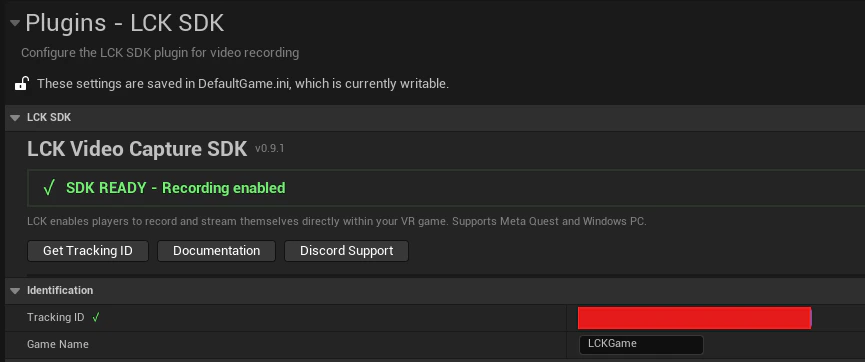
Recording will NOT work without a valid Tracking ID. Get yours from the LCK Dashboard before shipping.
Telemetry Events
ELCKTelemetryEventType
| Event | Description | When Sent |
|---|
SessionStart | SDK initialized | On game start |
SessionEnd | SDK shutdown | On game exit |
RecordingStart | Recording began | When StartRecording called |
RecordingStop | Recording ended | When StopRecording called |
RecordingError | Recording failed | On encoder/save error |
PhotoTaken | Photo captured | When TakePhoto called |
CameraModeChanged | Camera mode switched | On Selfie/FP/TP change |
QualityChanged | Quality profile changed | On SD/HD/2K/4K selection |
OrientationChanged | Orientation changed | On Landscape/Portrait toggle |
TabletSpawned | Tablet actor created | When tablet spawns |
TabletDestroyed | Tablet actor destroyed | When tablet despawns |
AudioSourceChanged | Audio config changed | On audio source toggle |
ULCKTelemetrySubsystem
The telemetry subsystem is a UGameInstanceSubsystem that manages all analytics.
Sending Custom Events
ULCKTelemetrySubsystem* Telemetry = GetGameInstance()->GetSubsystem<ULCKTelemetrySubsystem>();

// Send event with context
Telemetry->SendEvent(
    ELCKTelemetryEventType::RecordingStart,
    TEXT("quality=HD,orientation=Landscape")
);
Querying Current State
FString TrackingId = Telemetry->GetCurrentTrackingId();
Data Collected
Session Data
| Field | Description | Example |
|---|
| Tracking ID | Your project identifier | abc123-... |
| Device ID | Hashed device identifier | MD5 hash |
| Platform | Operating system | Windows, Android |
| Engine Version | Unreal Engine version | 5.4.0 |
| SDK Version | LCK SDK version | 0.9.2 |
Event Data
| Field | Description | Example |
|---|
| Event Type | Type of event | RecordingStart |
| Timestamp | When event occurred | ISO 8601 |
| Context | Additional details | quality=HD |
| Duration | Recording length | 120.5 seconds |
Device ID Hashing
Device IDs are hashed using MD5 before transmission:
FString DeviceId = FPlatformMisc::GetDeviceId();
FString HashedId = FMD5::HashAnsiString(*DeviceId);
// Only the hash is sent, never the raw device ID
Privacy
What We Collect
- Anonymous usage statistics
- Error reports (no personal data)
- Feature usage patterns
- Recording success/failure rates
What We DON’T Collect
- Personal information
- Video content
- Audio content
- User credentials
- IP addresses (beyond standard HTTP)
- Location data
Data Retention
- Telemetry data is retained for 90 days
- Aggregated statistics are kept indefinitely
- Individual session data is not accessible
Dashboard Analytics
View your telemetry data on the LCK Dashboard:
There’s approximately a 24-hour delay in reporting to allow for data aggregation and privacy processing.
Available Metrics
- Total recordings created
- Average recording duration
- Quality profile distribution
- Error rates by type
- Daily/weekly/monthly trends
- Platform breakdown
Debugging Telemetry
Enable verbose logging to debug telemetry issues:
; DefaultEngine.ini
[Core.Log]
LogLCKTelemetry=VeryVerbose
#if !UE_BUILD_SHIPPING
    ULCKTelemetrySubsystem* Telemetry = GetGameInstance()->GetSubsystem<ULCKTelemetrySubsystem>();
    UE_LOG(LogTemp, Log, TEXT("Telemetry enabled: %s"),
           Telemetry->IsTelemetryEnabled() ? TEXT("Yes") : TEXT("No"));
    UE_LOG(LogTemp, Log, TEXT("Tracking ID valid: %s"),
           ULCKDeveloperSettings::Get()->IsTrackingIdValid() ? TEXT("Yes") : TEXT("No"));
#endif
See Also

