Key Features
Mixed Reality Capture
- Creates seamless real-time MR capture by blending the player’s real-world video with virtual VR environments.
- Supports two capture workflows:
- Background-only Capture: Isolates the background layer for compositing.
- Full Composition: Combines real and virtual elements into a unified view.
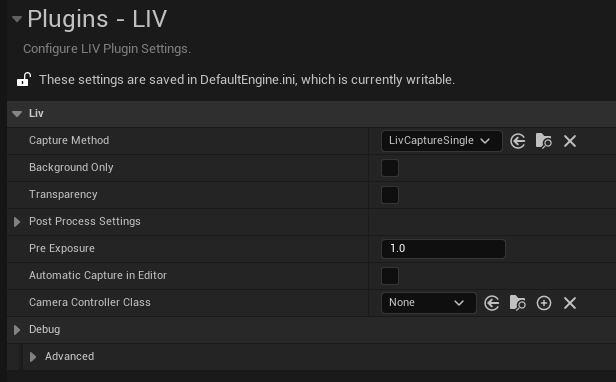
Customizable Capture Methods
Choose from three capture methods that balance performance, transparencyMeta Presence Platform Integration (Unreal Engine 5.4+)
When using Unreal Engine 5.4 or later, the LIV SDK connects with Meta’s Presence Platform via the Meta Fork to deliver these advanced Mixed Reality features:- Passthrough: Seamlessly blend the real environment with virtual content in real-time.
- Spatial Anchors: Lock virtual objects to specific points in the real world.
- Scene API: Harness real-world spatial data to create dynamic MR experiences.
Device and Platform Compatibility
Supported Unreal Engine Versions
Platform Requirements
- DirectX 11: Required for all LIV functionality.
- Note: DirectX 12 is not supported. Use DirectX 11 via Unreal’s Project Settings.
- Windows OS: Supported for development and deployment.
- VR Headsets: SteamVR-compatible devices for camera tracking (Oculus Quest, HTC Vive, Valve Index, etc)
What’s Included in the LIV SDK?
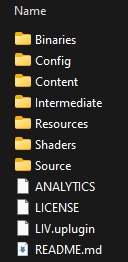
The LIV SDK includes these essential components for Unreal Engine integration:- Core Plugin Files:
-
LIV.uplugin: Unreal Engine plugin definition file. - Source Folder: C++ source code for MR functionality.
-
Content Folder: Essential assets (ex: shaders, configuration files).
-
- Configuration Tools:
- Settings for capture methods, and clipping planes. (Ignore “Transparency” option)
- Compatibility settings for Meta Presence Platform features.