

Overview
This guide covers:- Accessing the LCK subsystem and service
- Tablet actor lifecycle
- Widget component setup
- Async callback patterns
Accessing LCK Service
Via World Subsystem
The recommended way to access LCK functionality:From Any Actor
Blueprint Access
Tablet Lifecycle
Spawning
Destruction
Lifecycle Events
Enabling Grabbing
The UI doesn’t handle grabbing mechanics. Assume that it’s game-specific and it’s up to developers to integrate this. Here’s an example of how to add the GrabComponent from Unreal’s VR Template. Make sure that you call GrabStarted and GrabEnded methods on LCKTablet. You can set them up in C++ or Blueprint.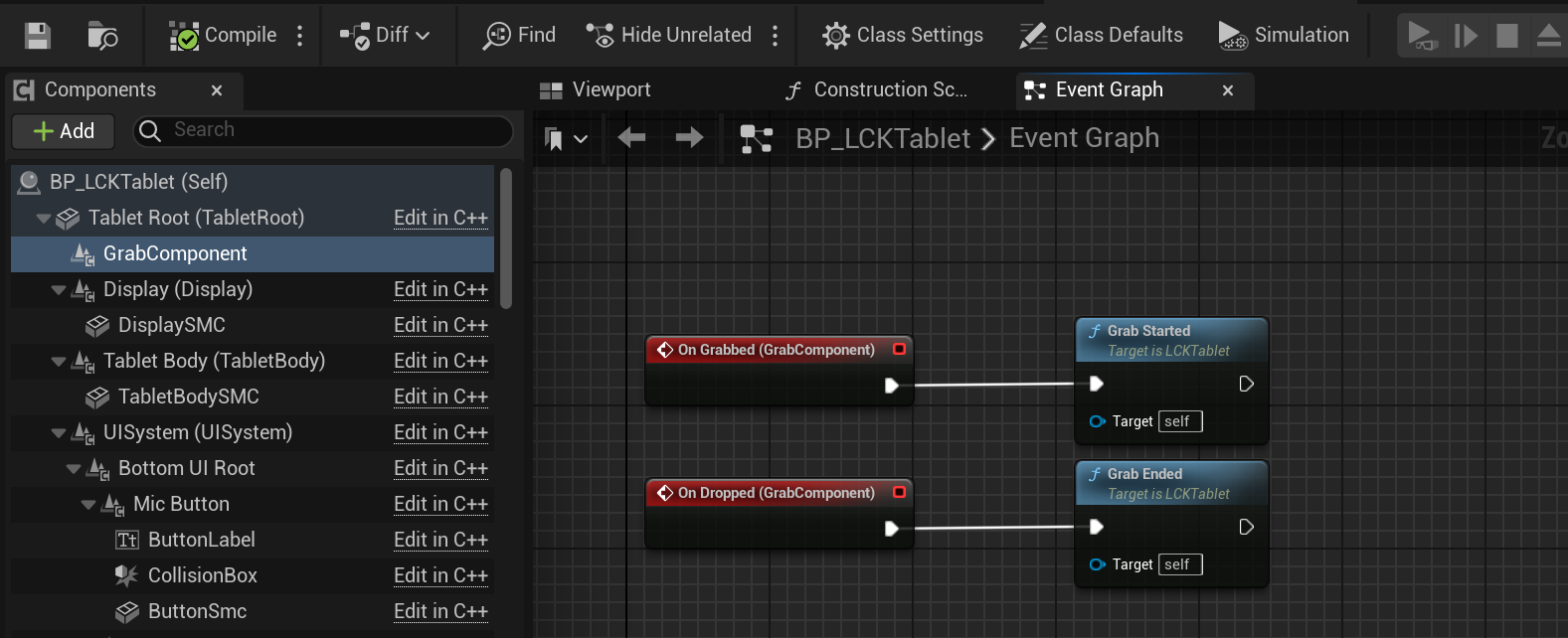
Widget Component Setup
ULCKWidgetComponent
The tablet uses a widget component for its 3D UI:Collision Setup
Weak Pointer Patterns
For safe async callbacks, always use weak pointers:TWeakObjectPtr Pattern
TWeakPtr for Shared Pointers
Event Subscription
Safe Delegate Binding
Initialization Order
Recommended Initialization Sequence
Troubleshooting Integration
Subsystem returns nullptr
Subsystem returns nullptr
Cause: World not valid or subsystem not registered.Solution:
Callbacks not firing
Callbacks not firing
Cause: Object destroyed before callback or delegate unbound.Solution: Use weak pointers and verify binding:
Widget not rendering
Widget not rendering
Cause: Widget component not properly configured.Solution: