Skip to main content
LCK Documentation home page
LIV Camera Kit (LCK)
Search...
⌘K
Ask AI
Dashboard
Dashboard
Search...
Navigation
Unity
Camera isn't rendered
Home
Getting Started
API Reference
Troubleshooting
FAQ
Support
Website
Discord
LIV Developer Dashboard
Unity
Unity LCK Troubleshooting
Tablet Jitter
Capture Log
Tablet Clipping
Tablet screen is grey
Blank Screen At Runtime
Tablet clipping into Avatar
Microphone not working with Photon
Newtonsoft could not be found
Audio is not picked up
Camera isn't rendered
Other client's voices not captured when using Photon Voice
Unreal
Unreal Troubleshooting
Unity
Camera isn't rendered
Copy page
Unity LCK Troubleshooting | Can’t see camera
Copy page
Problem
: The camera isn’t visible to the player
Cause
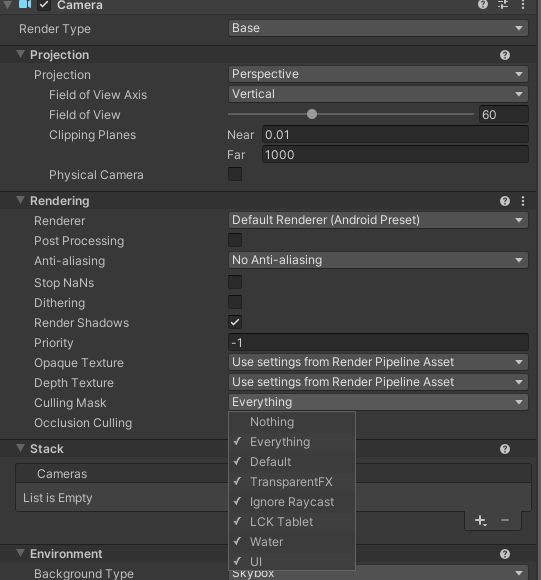
: The camera culling mask is probably disabled
Solution
: Enable LCK Tablet in the Culling Mask otpion
Select your main camera
Select Rendering -> Culling Mask
Verify LCK Tablet is enabled
Audio is not picked up
Other client's voices not captured when using Photon Voice
⌘I