LCK Documentation home page
Search...
⌘K
Ask AI
Support
Dashboard
Dashboard
Search...
Navigation
Troubleshooting
Tablet screen is grey
Unity Guides
Unity API reference
Unreal Guides
Unreal API Reference
Website
Discord
Dashboard
Getting Started
Welcome
Installation
Quickstart
Changelog
Customization
Introduction to LCK
Quality Config
Tablet Customisation
Tablet Introduction
Spawning The Tablet
Audio
Upgrade Guide
Troubleshooting
Other client's voices not captured when using Photon Voice
Camera isn't rendered
Newtonsoft could not be found
Audio is not picked up
Microphone not working with Photon
Tablet clipping into Avatar
Cant grab tablet
Blank Screen At Runtime
Tablet screen is grey
Tablet Clipping
Capture Log
Learn More
Frequently Asked Questions
Known Issues
Marketing with LCK
Data Privacy & Telemetry
Contact Us
Troubleshooting
Tablet screen is grey
Copy page
Copy page
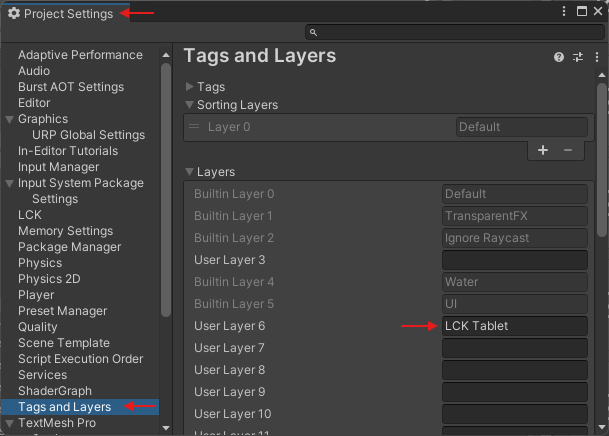
Problem: Tablet screen is grey / LCK Tablet layer ‘LCK Tablet’ not found in project layers error.
Cause: Unable to find LCK Tablet layer
Solution: Check that you’ve added the ‘LCK Tablet’ layer to your project layers.
Blank Screen At Runtime
Tablet Clipping
⌘I