

Module: LCKFMOD | Version: 0.9.2 | Platforms: All
Overview
LCKFMOD provides integration with FMOD Studio, capturing game audio output for recording. This plugin hooks into the FMOD audio system to capture the final mixed output.Supported Channels
| Channel | Supported | Description |
|---|---|---|
Game | Yes | FMOD Studio master bus output |
Microphone | No | Use LCKUnrealAudio or LCKOboe |
VoiceChat | No | Use LCKVivox |
Requirements
- FMODStudio plugin for Unreal Engine
- FMOD Studio project configured in your game
Dependencies
Automatic Integration
The plugin automatically:- Detects FMOD Studio plugin presence
- Registers capture callback on the master bus
- Registers with the LCK audio system
Capture Point
LCKFMOD captures audio from the FMOD master bus after all mixing and effects processing:Technical Details
DSP-Based Capture
The plugin uses FMOD’s DSP system to intercept audio non-destructively:- DSP attached at
FMOD_CHANNELCONTROL_DSP_TAILposition - Audio callback runs on FMOD audio thread
- Data is marshaled to game thread via
AsyncTask - PCM format: 32-bit float, interleaved
Configuration
Sample Rate
We recommend setting the sample rate explicitly to 48kHz rather than leaving it at 0 (auto):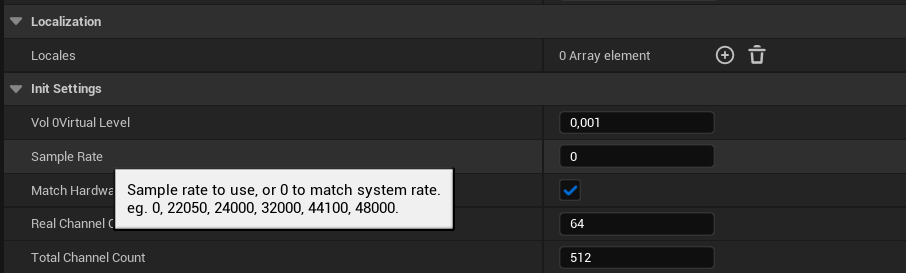
Output Format
Set FMOD Output Format to Stereo. The default 5.1 surround is not supported at this time.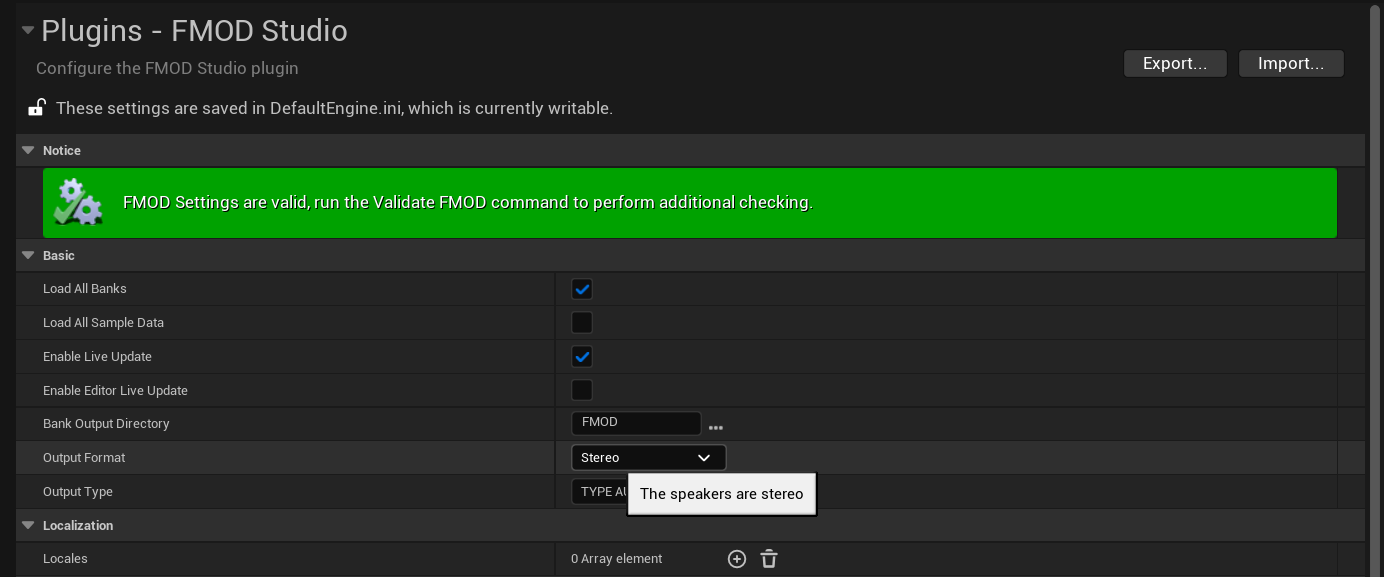
Performance
LCKFMOD has minimal performance impact:| Metric | Impact |
|---|---|
| CPU | < 1% overhead |
| Memory | ~2MB buffer |
| Latency | < 1 frame |
Compatibility
| FMOD Version | Status |
|---|---|
| 2.02.x | Supported |
| 2.01.x | Supported |
| 2.00.x | Supported |
Troubleshooting
No audio captured
No audio captured
- Verify FMOD Studio plugin is enabled
- Check that audio is playing through FMOD
- Verify master bus is not muted
- Check LogLCKFMOD for errors
Audio distortion
Audio distortion
- Check sample rate matches between FMOD and encoder
- Verify buffer sizes are adequate
- Check for CPU overload in FMOD profiler