

Installation Issues
LCK packages do not appear in Unity after installation
LCK packages do not appear in Unity after installation
tv.liv.lck and tv.liv.lck-streaming folders are placed directly inside {YourProject}/Packages/ (not nested), then reopen Unity.Example: https://discord.com/channels/344602581735178260/1364680437485797398
- Confirm you’ve properly installed LCK, noting that the editor must be closed first
-
Ensure you’re not hiding packages. Toggle the ‘eye control’ to show or hide packages

Errors or crashes when installing LCK
Errors or crashes when installing LCK
Errors after upgrading LCK
Errors after upgrading LCK
tv.liv.lck and tv.liv.lck-streaming folders first, then add the new versions. Upgrading while Unity is open will fail because Unity never unloads libraries during a session.Compilation error: 'Newtonsoft' could not be found
Compilation error: 'Newtonsoft' could not be found
Newtonsoft Json installed in the package manager.Code stripping errors with IL2CPP or high Managed Stripping Level
Code stripping errors with IL2CPP or high Managed Stripping Level
Packages\tv.liv.lck\Runtime\Scripts\Streaming\LckStreamingController.cs(392,39): error CS1061: ‘LckTopButtonsController’ does not contain a definition for ‘SetActive’ and no accessible extension method ‘SetActive’ accepting a first argument of type ‘LckTopButtonsController’ could be found (are you missing a using directive or an assembly reference?) Packages\tv.liv.lck\Runtime\Scripts\Streaming\LckStreamingController.cs(390,64): error CS1061: ‘LckTopButtonsController’ does not contain a definition for ‘activeSelf’ and no accessible extension method ‘activeSelf’ accepting a first argument of type ‘LckTopButtonsController’ could be found (are you missing a using directive or an assembly reference?)Example https://discord.com/channels/344602581735178260/1464258924277665926

tv.liv.lck-streaming package can’t be found in the \Packages folderSolution:- If you want streaming functionality, the package must be included. It’s part of the SDK download. Revivew Unity Installation. Unzip and add the package
- If it’s intended to not include streaming, you will need to modify the below code. A future v1.4.4 patch will include this change but you can do it yourself ahead.
Recording Issues
Tablet screen is grey / LCK Tablet layer 'LCK Tablet' not found in project layers error
Tablet screen is grey / LCK Tablet layer 'LCK Tablet' not found in project layers error
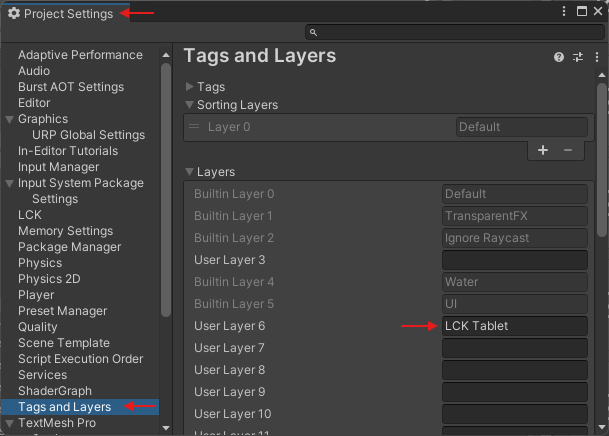
Recording produces ERROR or fails on Quest with OpenGL
Recording produces ERROR or fails on Quest with OpenGL
Recordings not showing up in gallery, videos saving with NaN size
Recordings not showing up in gallery, videos saving with NaN size
Camera stops recording when the scene changes
Camera stops recording when the scene changes
DontDestroyOnLoad on the tabletLong recordings become corrupt (video skipping, truncated output)
Long recordings become corrupt (video skipping, truncated output)
Video and audio artifacts at the beginning of recording
Video and audio artifacts at the beginning of recording
Color output does not match the game on Quest
Color output does not match the game on Quest
Audio Issues
Audio artifacts or dropped audio in recordings
Audio artifacts or dropped audio in recordings
Audio is not being picked up or you're having other audio issues
Audio is not being picked up or you're having other audio issues
FMOD audio not captured
FMOD audio not captured
LCK_FMOD for FMOD 2.02, or LCK_FMOD_2_03 for FMOD 2.03+. Place an LckAudioMarker on the target GameObject.Wwise audio not captured
Wwise audio not captured
LCK_WWISE scripting define. Ensure you are on LCK v1.2.0+ for Wwise support. v1.2.1+ fixes additional Wwise capture issues.Microphone conflicts with Photon Voice
Microphone conflicts with Photon Voice
LCK_FMOD_WITH_UNITY_AUDIO combined with LCK_FMOD if running FMOD alongside Photon Voice. Fixed in v1.2.0+.If you’re using Photon Voice make sure the microphone type is set to use Photon and disable the fallback option below it.While using Photon Voice, other player's voices are not recorded
While using Photon Voice, other player's voices are not recorded
LckAudioCaptureFMODAndUnity. To use it, ensure you have the following defines set:LCK_FMOD(and optionally,LCK_FMOD_2_03if you’re using FMOD 2.03+)LCK_FMOD_WITH_UNITY_AUDIO
GameObject with an AudioListener component in the scene, unless you’ve manually added an ILckAudioSource to your scene.Remote user's audio is not being captured when using Vivox Voice
Remote user's audio is not being captured when using Vivox Voice
- Check that audio capture initialization occurs on all target platforms
- Verify platform-specific build configurations include necessary audio components
- Ensure conditional compilation or platform checks aren’t inadvertently excluding audio capture on certain clients
- Test audio recording functionality on each platform independently to confirm proper instantiation
Audio and/or Video does not record in other scenes
Audio and/or Video does not record in other scenes
[DontDestroyOnLoad](https://docs.unity3d.com/6000.3/Documentation/ScriptReference/Object.DontDestroyOnLoad.html)call on the gameobject with the Audio or Video to ensure the component persists during scene changes.Tablet Issues
Tablet jitters during movement
Tablet jitters during movement
LCKCameraController.Cause: The provided tablet prefabs will automatically update camera positioning during LateUpdate. Depending on how locomotion / interaction is implemented in your game, you may wish to change this to avoid object jitter in captures.Solution: Change the Update TimingTo change the update timing of tablet cameras, on the LCKCameraController component in your tablet prefab, use the “Camera Position Update Timing Mode” dropdown in the inspector.LCKCameraController -> CameraPositionUpdateTimingMode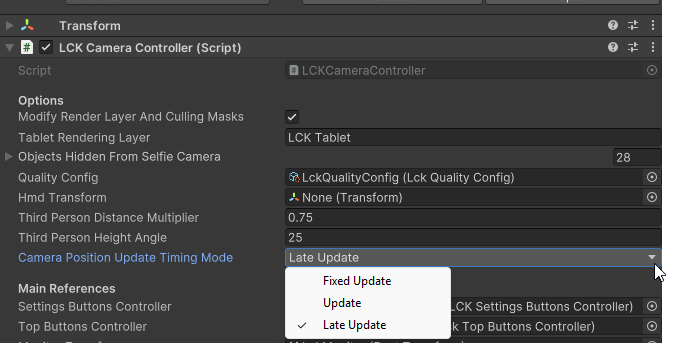
LckStabilizer component in your tablet prefab, use the “Stabilization Update Timing Mode” dropdown in the inspector.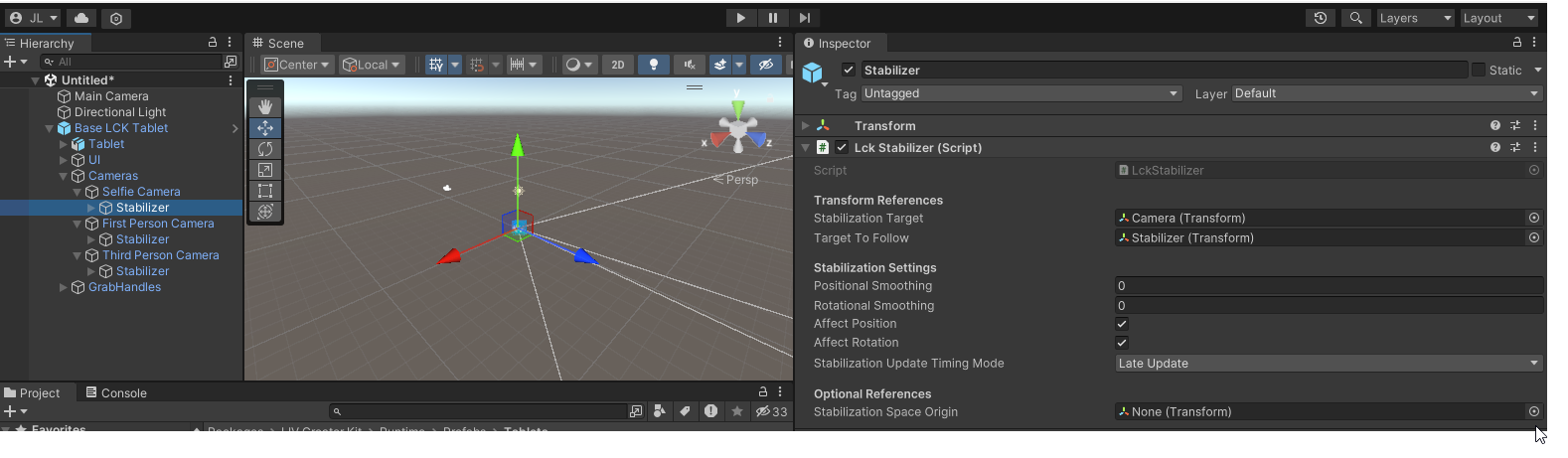
FixedUpdateUpdateLateUpdate
Tablet not responding to input or can't grab the tablet
Tablet not responding to input or can't grab the tablet
Hand tag (or your custom tag in Project Settings > LCK > Trigger Enter Tag). For raycast input, confirm Ray Interactor raycast mask includes Default and UI layers.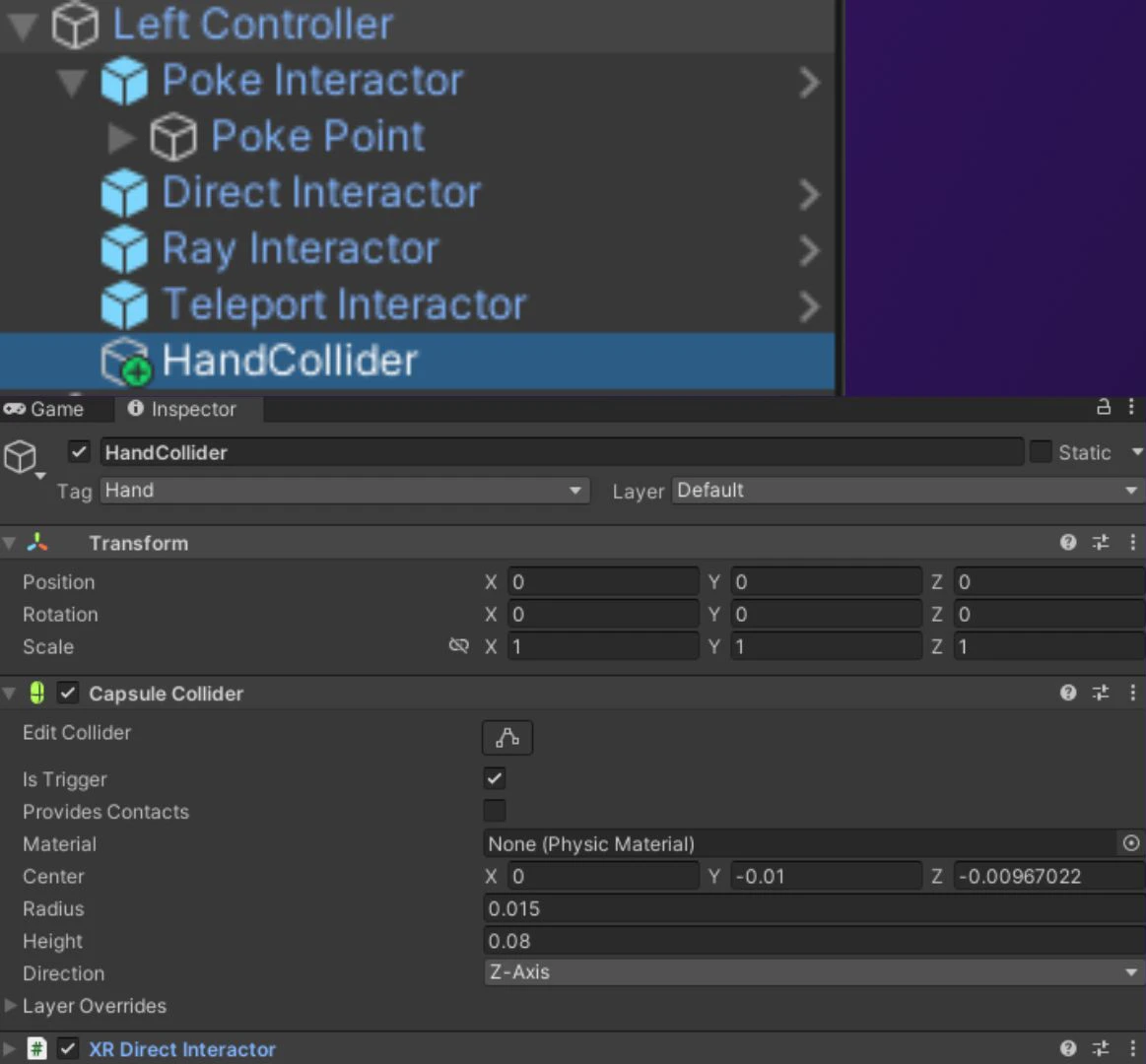
FPV/TPV cameras break after player camera is destroyed
FPV/TPV cameras break after player camera is destroyed
The tablet clips into the LCK capture
The tablet clips into the LCK capture
The tablet is clipping into the player model while in first person mode
The tablet is clipping into the player model while in first person mode
- Exclude the facial/head meshes from the LCK first person camera if possible.
- Increase the near clip plane value for LCK first person camera.
- Offset the LCK first person camera forward so that it is front of geometry.
The camera isn't visible to the player when in VR
The camera isn't visible to the player when in VR
- Select your main camera
- Select Rendering -> Culling Mask
-
Verify
LCK Tabletis created and enabled in the main camera Culling Mask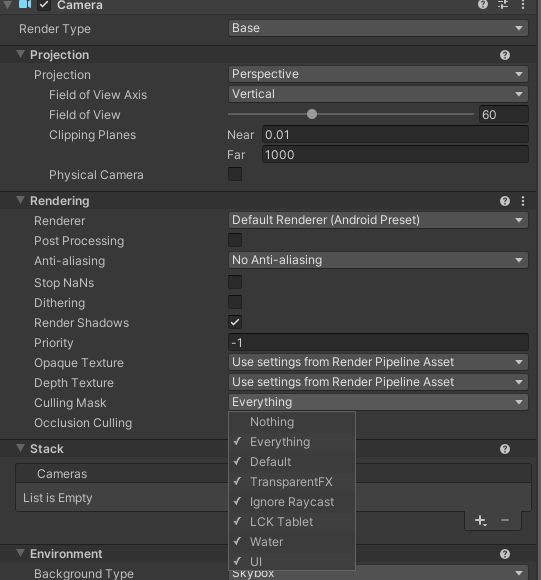
The tablet screen is blank/white at runtime
The tablet screen is blank/white at runtime
- Check you’ve initialized the LCK Service by placing the LCK Service Helper prefab in scene or otherwise.
- The screen will always look white in the editor and start displaying footage in play/runtime.
- Set Target Architecture target to ARM64
- [Android Only] Check you’re using Minimum API Level 32 or above.
- [Selfie Camera Issue Only] Turn on depth texture for the LCK selfie camera.
Platform Issues
Quest build: microphone permission not requested
Quest build: microphone permission not requested
Quest build: streaming fails (no internet)
Quest build: streaming fails (no internet)
ForceRemoveInternetPermission. Verify this is enabled in Project Settings > LCK.Memory leaks on recording stop
Memory leaks on recording stop
LCK error: LCK requires the Vulkan, OpenGLCore or DirectX11 graphics API on Windows
LCK error: LCK requires the Vulkan, OpenGLCore or DirectX11 graphics API on Windows
