Overview
At a high level, the process is as below;- Setup your Space in the Quest OS
- Start Meta Quest Link. Doesn’t work with Virtual Desktop or Steam Link.
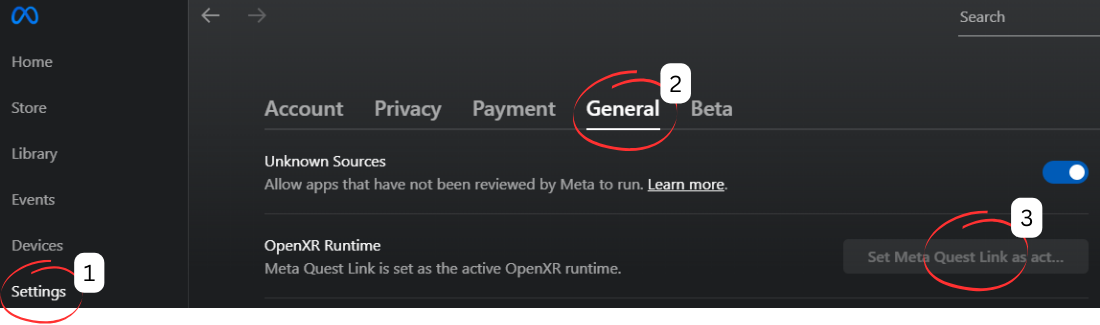
- Ensure Meta Quest Link is set as the active OpenXR runtime.
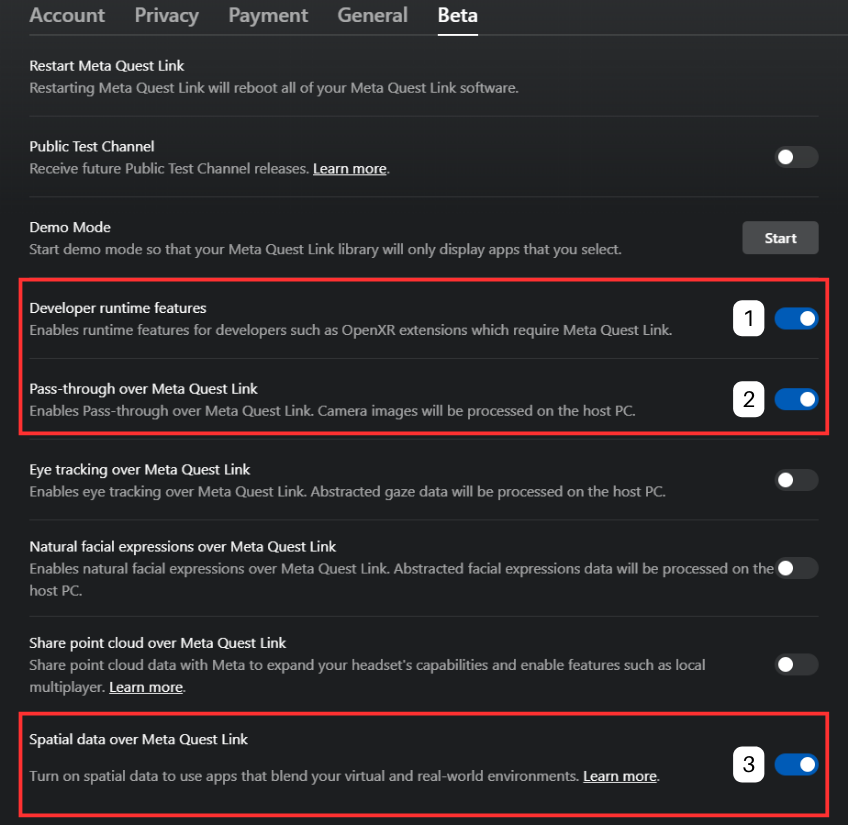
- In the Beta tab, ensure Developer Runtime Features,Pass through over Meta Quest Link, and Spatial Data over Meta Quest Link is enabled.
- Start LIV app on Steam.
- Start game with LIV 2.0 SDK
- Start LIV Mixed Reality Capture and manually select the game
- Start SteamVR
- Capture
Setting up Quest For Presence Platform
-
Ensure Meta Quest Link is set as the active OpenXR runtime.
-
In the Beta tab, ensure Developer Runtime Features,Pass through over Meta Quest Link, and Spatial Data over Meta Quest Link is enabled.