LCK sends anonymous usage telemetry to help improve the SDK. All data is aggregated and no personally identifiable information is collected.

Overview

The LCK telemetry system tracks SDK usage to:
  • Monitor recording success rates
  • Identify common issues
  • Improve SDK features
  • Provide analytics on the LCK Dashboard

Tracking ID

Every LCK integration requires a unique Tracking ID.

Getting Your Tracking ID

  1. Log in to the LCK Dashboard
  2. Create a new project or select existing
  3. Copy your Tracking ID

Configuring the Tracking ID

Navigate to Project Settings > Plugins > LCK SDK and enter your Tracking ID. Unreal Tracking ID setting
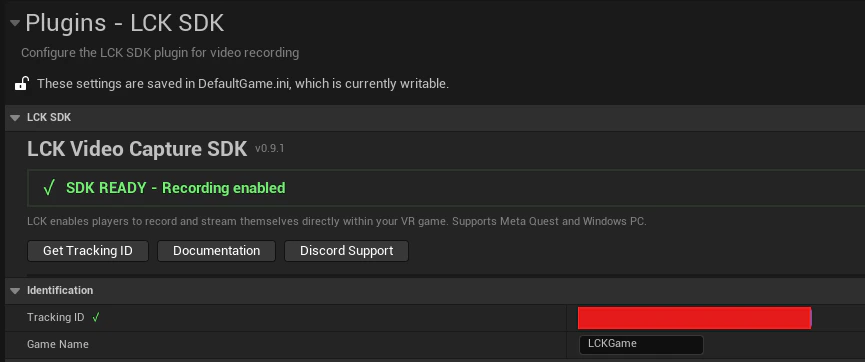
Recording will NOT work without a valid Tracking ID. Get yours from the LCK Dashboard before shipping.

Telemetry Events

ELCKTelemetryEventType

EventDescriptionWhen Sent
GameInitializedGame initializedOn game start
ServiceCreatedLCK service createdWhen service is initialized
ServiceDisposedLCK service disposedWhen service is deinitialized
CameraEnabledCamera enabledWhen camera is activated
CameraDisabledCamera disabledWhen camera is deactivated
RecordingStartedRecording beganWhen StartRecording called
RecordingStoppedRecording endedWhen StopRecording called
PhotoCapturedPhoto capturedWhen TakePhoto called
PhotoCaptureErrorPhoto capture failedOn photo capture error
RecorderErrorRecorder errorOn encoder/save error
SdkErrorSDK errorOn general SDK error
PerformancePerformance metricsPeriodically during recording
StreamingStartedStreaming beganWhen streaming starts
StreamingStoppedStreaming endedWhen streaming stops
StreamingErrorStreaming failedOn streaming error

ULCKTelemetrySubsystem

The telemetry subsystem is a UGameInstanceSubsystem that manages all analytics.

Sending Custom Events

ULCKTelemetrySubsystem* Telemetry = GetGameInstance()->GetSubsystem<ULCKTelemetrySubsystem>();

// Send a telemetry event
FLCKTelemetryEvent Event;
Event.EventType = ELCKTelemetryEventType::RecordingStarted;

FLCKTelemetryValue QualityValue;
QualityValue.StringValue = TEXT("HD");
QualityValue.ValueType = 2; // String
Event.Context.Add(TEXT("quality"), QualityValue);

Telemetry->SendTelemetry(Event);

Querying Current State

FString TrackingId = Telemetry->GetCurrentTrackingId();

Data Collected

Session Data

FieldDescriptionExample
Tracking IDYour project identifierabc123-...
Device IDHashed device identifierMD5 hash
PlatformOperating systemWindows, Android
Engine VersionUnreal Engine version5.4.0
SDK VersionLCK SDK version1.0

Event Data

FieldDescriptionExample
Event TypeType of eventRecordingStarted
TimestampWhen event occurredISO 8601
ContextAdditional detailsquality=HD
DurationRecording length120.5 seconds

Device ID Hashing

Device IDs are hashed using MD5 before transmission:
FString DeviceId = FPlatformMisc::GetDeviceId();
FString HashedId = FMD5::HashAnsiString(*DeviceId);
// Only the hash is sent, never the raw device ID

Privacy

What We Collect

  • Anonymous usage statistics
  • Error reports (no personal data)
  • Feature usage patterns
  • Recording success/failure rates

What We DON’T Collect

  • Personal information
  • Video content
  • Audio content
  • User credentials
  • IP addresses (beyond standard HTTP)
  • Location data

Data Retention

  • Telemetry data is retained for 90 days
  • Aggregated statistics are kept indefinitely
  • Individual session data is not accessible

Dashboard Analytics

View your telemetry data on the LCK Dashboard:
There’s approximately a 24-hour delay in reporting to allow for data aggregation and privacy processing.

Available Metrics

  • Total recordings created
  • Average recording duration
  • Quality profile distribution
  • Error rates by type
  • Daily/weekly/monthly trends
  • Platform breakdown

Debugging Telemetry

Enable verbose logging to debug telemetry issues:
; DefaultEngine.ini
[Core.Log]
LogLCK=VeryVerbose
Check telemetry status:
#if !UE_BUILD_SHIPPING
    ULCKTelemetrySubsystem* Telemetry = GetGameInstance()->GetSubsystem<ULCKTelemetrySubsystem>();
    UE_LOG(LogTemp, Log, TEXT("Tracking ID: %s"), *Telemetry->GetCurrentTrackingId());
    UE_LOG(LogTemp, Log, TEXT("Tracking ID valid: %s"),
           ULCKDeveloperSettings::Get()->IsTrackingIdValid() ? TEXT("Yes") : TEXT("No"));
#endif

See Also

Project Settings

Configure Tracking ID and other settings

LCK Dashboard

View your analytics